Amazon removal orderA removed unit is a loss.
Your books should say so.
An Amazon removal order has Amazon send your FBA units back to you, dispose of them or liquidate them, for a per-item charge. Remworth files Return or Disposal removal orders for your stranded listings, shows you the exact file before it goes, and books removals as the losses they are, with the fees Amazon charged.
- OrdersReturn or Disposal, for stranded listings
- Unitscapped at Amazon's stranded count
- Previewthe exact file Amazon receives
- Bookslosses at cost, fees from Amazon's records
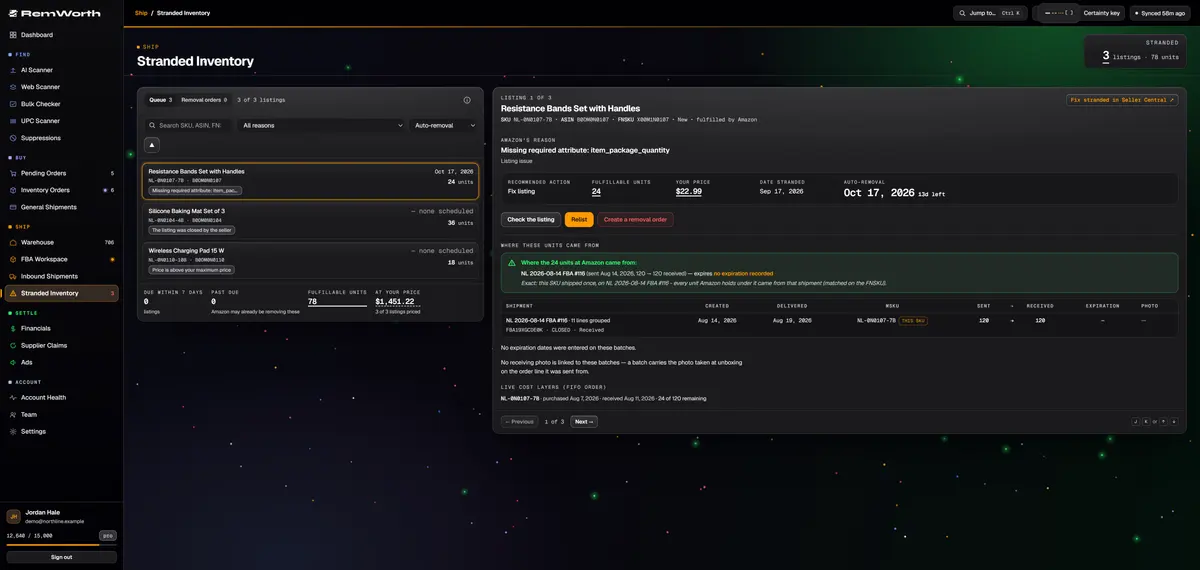
File one from Remworth
How to create a removal order for stranded stock
Remworth files removal orders from the Stranded Inventory page. For stock that isn't stranded, use Seller Central.
- Open the stranded listingRemworth checks Amazon's stranded report automatically. Each listing shows Amazon's reason, its recommended action and the auto-removal date, soonest first.
- Choose Return or DisposalReturn ships the units back to you. Disposal has Amazon dispose of them.
- Set the unitsEnter sellable and unsellable units. Each is capped at the count in Amazon's stranded report.
- Check the addressA Return needs a ship-to address and a phone number. Remworth prefills your ship-from address. Add shipping notes if you want.
- Preview the exact fileYou see the file exactly as Amazon will receive it. Nothing is sent until you confirm, and Amazon's per-unit fees apply once you do.
- Follow it under Removal ordersRefresh status shows Amazon's status for the file you sent and its processing report, word for word. Only one removal per SKU can be in progress at a time.
The books
What gets booked when units leave Amazon
A unit that leaves on a removal order earned nothing. Remworth books it that way.
- Sent back or disposed
- booked at the unit's cost against $0 of sales: a loss, never counted as a sale or in units sold
- All removals
- booked as the losses or credits they really are, in the period they happened
- Fees
- removal and disposal fees taken from Amazon's own records
- Cancelled units
- when Amazon's removal report shows units it cancelled, their cost is credited back to the month it was booked
- Removals ledger
- each removal's date, ASIN, type, units, fee and proceeds, with period totals; search by ASIN or type
- Profit
- net profit takes in removal outcomes next to FIFO COGS, freight, refunds, reimbursements and fees
- Export
- the P&L export carries the removal lines, including the credit for cancelled units
Amazon's side
Amazon removal and disposal fees, and where to find them
Amazon puts it plainly: you can have Amazon return, dispose of or liquidate your inventory in a fulfillment center for a per-item charge.
In 2026 Amazon changed when it charges. For removal and disposal orders created on or after March 1, 2026, the fees are charged per unit, as each unit is removed or disposed of, instead of all at once when the whole order completes. Amazon called it a timing change only: the rates did not change. To see shipment-level charges and when units were removed, Amazon points you to Payments, then Transaction view.
For the details, Amazon's announcement sends sellers to its FBA removal order fees and FBA disposal order fees pages in Seller Central, which need a sign-in. In Remworth you see the fees Amazon actually charged you, by period.
Amazon's removal reports
Two Amazon reports cover removals. The Removal Order Detail report lists each removal order and its items, with requested, cancelled, disposed, shipped and in-process quantities and the removal fee. The Removal Shipment Detail report has the carrier and tracking number for units shipped back. It leaves out disposed items and cancelled returns.
Other ways out
Amazon also offers automatic removal settings, which return or dispose of unsold products based on criteria you set, and FBA Donations, which gives unsold products to US charities.
Straight answers
What it doesn't do.
- It only files removal orders for stranded listings. To remove healthy, in-stock inventory, use Seller Central.
- It doesn't offer Liquidation. Use Amazon's own flow in Seller Central for that.
- It doesn't cancel a removal order after you file it.
- It doesn't show tracking numbers for removal shipments. Amazon's Removal Shipment Detail report has them.
- It doesn't decide for you. You see Amazon's reason and recommended action; whether to relist or remove is your call.
Next in the workflow
Questions
Removal order questions
What is a removal order on Amazon?
It's how you get inventory out of an Amazon fulfillment center. A removal order has Amazon return your units to you, dispose of them or liquidate them, for a per-item charge. Sellers use it to clear stranded, unsellable or unsold stock.
How do I create a removal order on Amazon?
In Seller Central you create and confirm removal orders yourself, and Amazon has a video that walks through it. For a stranded listing, Remworth can file it for you: open the listing on Stranded Inventory, choose Create a removal order, pick Return or Disposal, set the units, check the preview of the exact file, and confirm. For healthy stock, use Seller Central.
How much does Amazon charge for a removal order?
A per-item fee, set by Amazon. For the details, Amazon points sellers to its FBA removal order fees and FBA disposal order fees pages in Seller Central (sign-in needed). For orders created on or after March 1, 2026, Amazon charges the fee per unit as each unit is removed or disposed of, not when the whole order finishes; the rates themselves did not change. Remworth shows the removal and disposal fees Amazon actually charged you, by period.
How do I track an Amazon removal order?
Amazon's Removal Order Detail report shows each order's status and its requested, cancelled, disposed and shipped units. The Removal Shipment Detail report has the carrier and tracking number for units shipped back. In Remworth, a removal you file from Stranded Inventory shows Amazon's status for the file you sent and its processing report, and removals Amazon has posted to your account show in your Removals ledger. Remworth doesn't show removal tracking numbers.
What if Amazon cancels part of my removal order?
Cancelled units never left, so they aren't a loss. Amazon's Removal Order Detail report shows the cancelled quantity, and when it does, Remworth credits those units' cost back to the month it was booked, automatically.
How do I account for removed inventory?
Remworth counts a removed unit as a loss, whether it was sent back to you or disposed of. It earned nothing, so its cost comes out of profit, Amazon's fee comes out too, and it never counts as a sale. How your business treats returned stock you plan to resell is a question for your accountant.
Can I try it free?
Yes. The 7-day trial is free with a card on file, and Stranded Inventory and Financials both work in it. A removal order you file is real, and Amazon charges its fee for it.
Get removals on the books, at cost.
Connect your Amazon account, open Stranded Inventory, and find your removals and their fees in Financials.
Solo $199.99/mo · Pro $349.99/mo · 7 days free, card required
On your phone? Start with just your email. The link we email you works once, on any device, within 7 days, and the app opens once you've picked a plan, added your card and connected your Amazon seller account.
Your Amazon password stays with Amazon. How Remworth connects.
Sources
- Amazon: Fulfillment by Amazon return, dispose of or liquidate inventory for a per-item charge
- Amazon (News_Amazon, Jan 29 2026): FBA removal and disposal fees to be charged as units are processed per-unit charging for orders created from March 1, 2026; rates unchanged; Payments, Transaction view; the FBA removal and disposal order fees pages
- Amazon SP-API documentation: FBA reports Removal Order Detail and Removal Shipment Detail reports; stranded report columns
- Amazon: What every seller should know about dead stock automatic removal settings, FBA Donations, removal order video