Amazon warehouse management system"It's in the garage somewhere"
is not an inventory system.
Amazon warehouse management for the stock you hold before it goes to FBA. Make zones, shelves and bins, scan stock into its bin, print FNSKU labels from the browser, and see every unit's cost, supplier, expiry date and shelf age in one place.
- Locationszones, shelves and bins, as many as you need
- Scanan MSKU or ASIN to a bin, with a standard barcode scanner
- Labels2 x 1 inch FNSKU labels, printed from the browser
- Every unitits cost, supplier, expiry date and shelf age
The Warehouse, start to finish
From the receiving table to the shelf to FBA.
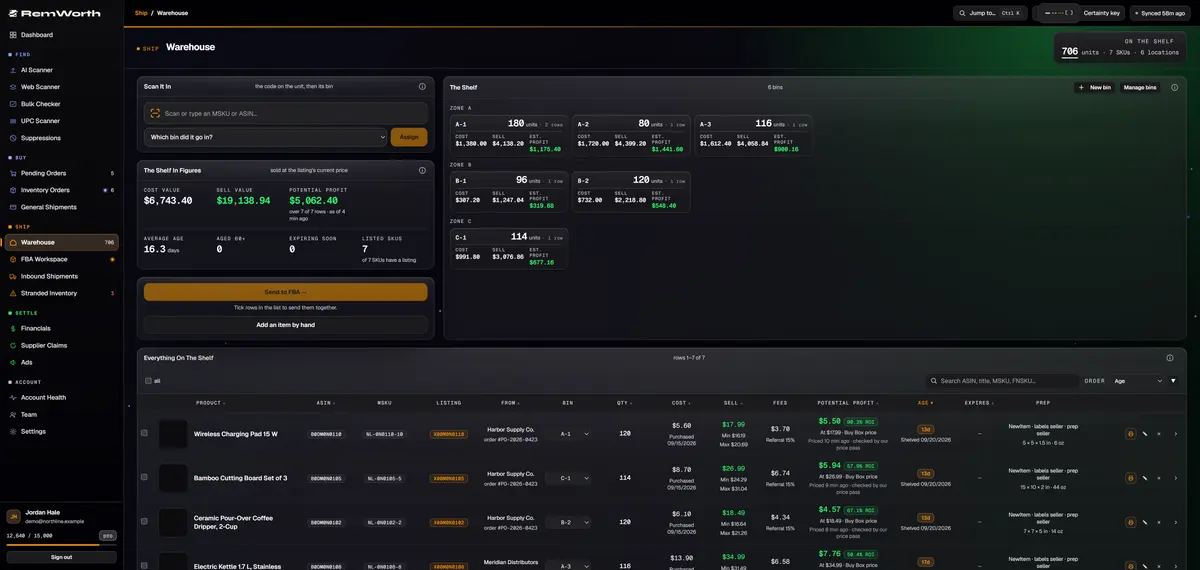
Make a bin for each place stock sits: a zone, plus a shelf and bin if you use them. Each tile shows its units, what they cost you, what they would sell for and what they stand to make.
Scan or type an MSKU or ASIN with a standard barcode scanner, pick the bin, hit Assign. The match is found across your whole shelf, not just the rows on screen.
What the shelf cost you, and what it would sell for and make at the listings' current prices. Under them: average shelf age, what has sat 60+ days, what expires within 30 days, and how many SKUs have a listing.
No listing yet? Create it from the row and Remworth requests the FNSKU, then shows it on the row when Amazon assigns it. Print 2 x 1 inch labels for one row or a whole batch.
Loose singles of a multipack that share a SKU pool into complete sellable packs, even when they came from separate orders. The badge says how many packs are ready, or how many more units you need.
Tick rows and add them to an open FBA shipment, or start a new one. With multipacks, you see how many listings ship and which loose units stay on the shelf before you commit.
What the Warehouse keeps
Everything the sticky note on the tote used to hold.
- Locations
- zones, shelves and bins, as many as you need; a bin still holding stock can't be deleted until you move it
- Every unit
- its cost, supplier, expiry date and shelf age
- From the order
- units sent from a purchase order arrive with their costs, prices, tax codes, pack size and expiry date, under a SKU built from your own pattern
- Batches
- new stock merged into an existing row keeps its own cost, supplier and purchase date
- Odd stock
- returns, liquidation lots or found stock added by ASIN, with catalog data pulled and a cost record of its own
- Potential profit
- per row, at the listing's current price after Amazon's fees and your own costs, kept current as the price moves
- Alerts
- age badges turn amber at 30 days and red at 60; items expiring within 30 days are counted
- Labels
- 2 x 1 inch FNSKU labels (MSKU until the FNSKU arrives) with condition and title, the Best By date when the item has one, and cut lines between SKUs
- Find it
- search by ASIN, title, MSKU or FNSKU; order the list by age, potential profit, expiry and more
- Team
- warehouse changes record who made them
Shelf to Amazon
How to send products to an Amazon warehouse from your shelf.
Amazon's route is the Send to Amazon workflow, which guides you through creating a shipment and preparing, packing and labeling your inventory. Remworth runs Amazon's inbound steps in the app, starting from your shelf.
- Receive itCount the order in against its purchase order, then Send to Warehouse. Its costs, pack size and expiry date come with it.
- Shelve itPick the bin as you send it, or scan the MSKU or ASIN later and assign one.
- Get the FNSKUTick Request FNSKU labels when you send it, or create the listing from the row later. The FNSKU shows on the row when Amazon assigns it.
- Label itPrint 2 x 1 inch labels for one row or every ticked row. Resellers need Amazon barcodes on inventory shipped on or after March 31, 2026.
- Send to FBATick the rows and add them to an open shipment, or start a new one by small parcel or pallets. Singles that share a SKU pool into complete packs; leftovers stay on the shelf.
- Finish in the FBA WorkspaceThe plan, packing and placement options, carrier, delivery window and box labels, then mark it shipped. Every unit's cost travels with it.
Garage or warehouse
Still running the shelf from memory?
Totes and a spreadsheet can hold stock. They can't tell you where a unit is, what the shelf is worth, or what is getting old.
Straight answers
What it doesn't do.
- It isn't a warehouse, a 3PL or a prep service. It's software for the stock you hold; the physical prep and labeling are done by you or your prep provider.
- It isn't built for picking FBM orders. It is a warehouse management system for Amazon FBA stock: the Warehouse holds units on their way to FBA.
- The scan box matches an MSKU or ASIN. To find a row by its FNSKU, use the search.
- It doesn't choose your Amazon destination. The FBA Workspace shows the placement options Amazon offers, and you pick.
- It doesn't decide whether you qualify to skip Amazon barcodes. Brand Registry is between you and Amazon.
Next in the workflow
Questions
Warehouse questions
How do I send products to an Amazon warehouse?
Amazon's own route is the Send to Amazon workflow, which guides you through creating a shipment and preparing, packing and labeling it. In Remworth you start from the shelf: tick the rows, choose Send to FBA, and add them to an open shipment or a new one. The FBA Workspace then runs Amazon's inbound steps in the app, from the plan and placement options to the carrier, delivery window and box labels, and you mark it shipped.
Do resellers have to use FNSKU labels now?
Yes. Amazon's announcement says that for inventory shipped on or after March 31, 2026, resellers who aren't a Brand Representative in Brand Registry must use Amazon barcode stickers, even when the product has a manufacturer barcode. Brand Representatives no longer need them for products that already carry a manufacturer barcode. Remworth creates the listing, requests the FNSKU and prints the label. It doesn't decide whether you qualify for the exception.
How do I get the FNSKU for a product on my shelf?
Create the listing from its warehouse row, or tick Request FNSKU when you send units to the warehouse or add them by hand. Remworth creates the listing and asks Amazon for the FNSKU. While the page is open it checks automatically, and the FNSKU appears on the row once Amazon assigns it. Click it to copy.
What size FNSKU label does Remworth print?
Each label is 2 inches wide by 1 inch tall, one per unit, printed from your browser to your label printer with a cut line between SKUs. Amazon's FBA labeling guide asks for labels 1 to 2 inches tall and 2 to 3 inches wide, showing a scannable barcode, the FNSKU, the product title and its condition. An FNSKU label from Remworth carries all four, plus the Best By date when the item has one.
What is a bin location, and do I need one?
A bin location is a named spot where stock sits, usually a zone, a shelf and a bin (A-2-3), so anyone can find a unit without asking you. In Remworth a zone on its own is enough; add a shelf and bin if your space has them. Scan a unit's MSKU or ASIN, pick its bin, and the row shows where it lives.
Is Remworth a 3PL or an FBA prep warehouse?
No. Remworth is software. It keeps the count, cost and bin of the stock you hold and prints its labels; the physical prep and labeling are done by you or a prep provider. Save more than one ship-from address in Settings and pick the right one when you create an FBA shipment. Label with care: Amazon staff have said units with missing or defective labels could be untraceable in Amazon's facilities and aren't eligible for reimbursement.
How do I keep track of what each unit on the shelf cost?
Every unit on the shelf carries its cost, supplier, expiry date and shelf age. Units sent from a purchase order bring their buy cost, pack size and expiry date with them. New stock merged into an existing row keeps its own cost, and stock you add by hand gets a cost record of its own. When units are lost, damaged or discarded, their cost is booked as a loss with the reason.
Is the Warehouse in the free trial?
Yes. The Warehouse is part of every plan and works throughout the 7-day free trial (card required). The trial has no AI scan rows; receiving, the Warehouse and FBA shipping all work in it.
Put your next order on a shelf.
Connect your Amazon account, make your first bin, and send your next received order to it.
Solo $199.99/mo · Pro $349.99/mo · 7 days free, card required
On your phone? Start with just your email. The link we email you works once, on any device, within 7 days, and the app opens once you've picked a plan, added your card and connected your Amazon seller account.
Your Amazon password stays with Amazon. How Remworth connects.
Sources
- Amazon: Fulfillment by Amazon Send to Amazon is Amazon's workflow for creating shipments, including preparing, packing and labeling
- Amazon: FBA prep, packaging and labeling guide (Jul 7, 2026) item labels 1 to 2 in tall and 2 to 3 in wide, with barcode, FNSKU, title and condition
- News_Amazon: commingling practices end March 31, 2026 resellers must use Amazon barcodes; the Brand Representative exception
- Bryce_Amazon, reply on prep and labels units with missing or defective labels could be untraceable and are not eligible for reimbursement