Remworth

Amazon analytics for sellers: profit and P&LProfit you can check
against the deposit.

Amazon analytics for sellers who need the profit, not just the sales. Remworth builds a per-product P&L from Amazon's own order and financial records plus the real cost of the units that filled each sale, then checks it against every settlement statement, order by order. Fees Amazon hasn't posted yet use Amazon's own estimate, marked as an estimate until the real fee lands.

Solo $199.99/mo · Pro $349.99/mo · 7 days free, card required

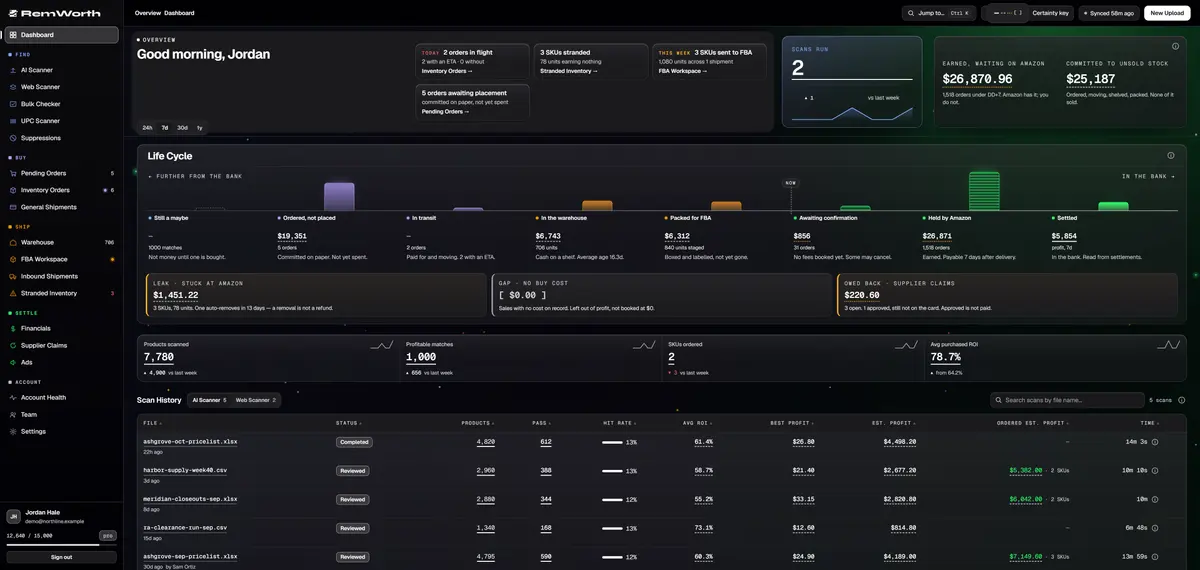
The Remworth dashboard with demo data: the Life Cycle axis runs from scan matches through stock on the shelf and money held by Amazon to profit for the period, with stranded stock, missing buy costs and open supplier claims underneath
The dashboard's Life Cycle. Eight stations on one axis, from a scan's maybes to profit for the period, so you can see how far each dollar is from your bank. Underneath: stock stranded at Amazon, sales with no buy cost, and supplier claims still owed. Demo data.

Accounting for Amazon FBA sellers

Four jobs behind the profit number.

FIFO & COGS

Every batch you receive becomes its own cost layer at the price you actually paid. Sales draw from the oldest stock first (first in, first out), so each sale carries the cost of the units that filled it.

  • no averaging, anywhere
  • a sale with no cost is held out of profit, never booked at $0
  • a sale drawn from a purchase you logged traces back to that supplier order
How FIFO cost works

Settlement reconciliation

Every settlement statement Amazon issues is checked against your books, order by order and category by category: sales, fees, promotions, refunds, reimbursements and ad spend, each with its own difference shown.

  • orders on a deposit but missing from the books, counted on every statement
  • statement lines it doesn't recognize are flagged, never dropped
  • expected payouts and your latest bank transfers, with trace IDs
How the deposit check works

Reimbursements

Reimbursements, refunds and removals are booked as the money they really are. A reimbursement counts as income without counting the unit's cost twice. A refund counts as what it cost you: the money refunded, less the fees Amazon gives back, plus the administration fee it keeps.

  • synced daily from Amazon's reimbursements report
  • credits that can't be matched are held aside and shown
  • removals booked as losses or credits, in the right period
How reimbursements are booked

Sales tax

Your Amazon sales by state for any year, quarter or month, one line per state: gross sales, taxed sales, tax collected, marketplace-facilitator tax, and tax refunded as the negative it is.

  • item tax and facilitator tax kept apart, never added into one total
  • a state-by-month grid and a CSV export
  • Remworth reports the figures; it doesn't file returns
How the state report works

The P&L

An Amazon profit and loss statement you can audit.

Per product and per period, searchable by ASIN, SKU or title. One definition of profit runs through the dashboard, the P&L and the export, and the dashboard and P&L totals are verified equal.

Revenue
principal only, the way Seller Central counts sales; buyer-paid shipping is its own line
Amazon fees
the actual referral, FBA and other fees from Amazon's records; until they post, Amazon's own estimate, with the number of sales still on an estimate shown in the Amazon fees column
Cost of goods
FIFO cost from the batch that filled each sale
Inbound freight
freight to Amazon as its own line, in the period the shipment ships
Refunds
net of the fees Amazon returns, plus the administration fee it keeps
Restocked returns
the unit's cost credited back, never counted twice
Reimbursements
income, without double-counting the unit's cost
Account fees
storage, disposal, removal, subscription and other service fees, from Amazon's own records
Ads and promotions
ad spend included; promotions netted on the sale they belong to
Kept out
orders Amazon hasn't confirmed, and sales with no buy cost, each in its own list
Periods
today, 7, 30 or 90 days, month to date, last month, year to date, all time, any month, or a custom range
Export
a one-page P&L summary, or by ASIN, supplier or month, in CSV or Excel
Amazon seller analytics

The rest of the numbers, each with its own question.

Sales Trends and SKU Economics use Amazon's own figures and say so on screen, so an ordered-basis chart is never mistaken for the P&L.

WhereThe question it answersWhat it shows
Sales TrendsAre sales growing?Amazon's own ordered-basis sales numbers, fetched live each view, up to 24 months by day, week or month
SKU EconomicsWhich SKU is the storage and ad money going to?Amazon's per-ASIN ad charges and storage, under Amazon's own fee names, by SKU, ASIN or parent
SuppliersWhich supplier earns its spend?spend, gross profit (before ad spend and refunds), ROI and lead time per supplier, with its ASINs ranked by profit
VelocityHow long is my money tied up in stock?purchase to sold out, split into supplier lead time, your turnaround, Amazon check-in and sell-through
InventoryDo my books match what Amazon holds?Amazon's inventory beside your cost ledger, with mismatched rows flagged
Inventory: ageWhich stock is heading for the aged-inventory surcharge?Amazon's six age buckets per SKU, with surcharge estimates before the fee hits
GeographicWhere do my buyers live?orders, units and revenue by ship-to state, with a by-city view

The trial is the audit

Seven days to test this month's numbers against yours.

The trial checks this month's books. This month's orders fill in on their own once you connect; earlier months don't backfill by themselves.

  1. Connect your Amazon accountApprove Remworth in Seller Central through Amazon's own consent screen. A non-US account is refused with nothing saved.
  2. Let this month fill inThis month's orders arrive on their own, and recent settlement statements follow, newest first. Older statements import through a guided four-step flow that starts at Seller Central's statements page.
  3. Fill in missing buy costsThe Buy Cost tab lists every product sold with no cost on record and the revenue held out. Type what you paid per unit once, and every uncosted sale of that product is costed and counted.
  4. Compare this monthPick Month to date as the period and put the revenue beside Seller Central's sales for the same dates. It is principal only, pending orders included, the way Seller Central counts sales.
  5. Read the newest depositOpen Reconciliation and expand the newest statement, at the top of the list. Sales, fees, promotions, refunds, reimbursements and ad spend each show their difference from the books. A deposit can also pay for orders from before your books start; the statement counts those as missing from books, not hidden.

Straight answers

What Remworth's profit side is not.

Around the money

Questions

Profit and accounting questions

How do I track profit on Amazon FBA?

Start from Amazon's own sales and fee records, then take off a cost no settlement statement carries: what you paid your supplier. The deposit alone won't tell you. In general Amazon settles seller accounts every two weeks: it adds your sales, subtracts expenses, adjusts for refunds and holds back an amount in reserve. Profit also needs ad spend, inbound freight and the after-sale money (refunds, reimbursements, removals), each in the right period. Remworth builds that per product and per period, from Amazon's own records and your FIFO cost.

Is the profit final, or an estimate?

Fees Amazon has posted are the actual fees from its financial records. A sale whose fees haven't posted yet carries Amazon's own fee estimate, refreshed automatically and replaced when the real fee lands. Click the Amazon fees column on the P&L and it shows how many sales in the period are still on Amazon's estimate, and each sale in a product's drill-down is badged Settled or Projected. Costs are never estimated: a sale with no buy cost is held out of profit.

How do I reconcile my Amazon settlement report with my bank deposit?

Treat the deposit as a net figure, not revenue: sales minus expenses, adjusted for refunds, less any reserve, and it can take up to five business days to reach your bank. Then match the statement to your books category by category. Remworth does that for every statement: sales, fees, promotions, refunds, reimbursements and ad spend, each with its difference, plus a count of orders on the deposit but missing from the books. More on the settlement reconciliation page.

Why is Amazon holding my money (DD+7)?

By default Amazon reserves an order's funds until it is delivered plus 7 days, its "DD+7" reserve, and then they become available for payout. Remworth shows that amount under its own label, earned but not yet available. Its Payouts card lists every expected payout with its amount, date and statement period, plus your latest bank transfers with their trace IDs, and any payout warning from Amazon in amber, in Amazon's own words. Remworth can't release held funds.

What should I give my accountant?

Ask your accountant for their list. Remworth covers these pieces: the P&L as a one-page summary, by ASIN, by supplier or by month, in CSV or Excel for any range, adding up line by line with credits for restocked returns included; and the Sales Tax tab's state-by-state CSV. A Form 1099-K is issued when payments pass $20,000 in more than 200 transactions, and the IRS says you must report all income either way. Its gross figure isn't reduced for fees, refunds or shipping, so it isn't your profit. This is not tax advice.

Does Remworth sync with my accounting software?

No. It doesn't post journals to any accounting package. It checks every Amazon settlement against its own books and exports the P&L as CSV or Excel for you or your bookkeeper. If you need settlements posted into accounting software, that is a separate tool.

Will Remworth's revenue match Seller Central?

It's built to: principal only, pending orders included, the way Seller Central counts sales. Buyer-paid shipping is its own line. Compare this month during your trial and see for yourself.

What happens to a sale with no buy cost?

It's held out of profit, never booked at $0, and listed on the Buy Cost tab with the revenue at stake. Type what you paid per unit once and every uncosted sale of that product is costed and folded back into your P&L.

Seven days to catch us being wrong.

Check this month's numbers against Seller Central and your bank. Older statements and buy costs come in through the imports. If our number doesn't hold up, cancel from the billing portal yourself.

Solo $199.99/mo · Pro $349.99/mo · 7 days free, card required

On your phone? Start with just your email. The link we email you works once, on any device, within 7 days, and the app opens once you've picked a plan, added your card and connected your Amazon seller account.

Your Amazon password stays with Amazon. How Remworth connects.

Sources

  1. Amazon: How Amazon seller payments work settlements in general every two weeks; how a payout is netted; up to five business days to reach the bank (page updated July 30, 2025)
  2. Amazon staff post (Micah_Amazon): Understanding Account Level Reserves the default reserve: funds held until 7 days after delivery ("DD+7"), then available for disbursement
  3. IRS: Understanding your Form 1099-K the more-than-$20,000-in-more-than-200-transactions threshold; all income must be reported
  4. IRS: What to do with Form 1099-K the gross amount is not adjusted for fees, refunds or shipping