Remworth

Search Amazon by UPCUp to 5,000 barcodes.
One upload.

Search Amazon by UPC for a whole supplier list at once. Upload the sheet and the UPC Scanner looks up every row on Amazon by its barcode, through your own seller account, with a title search for rows that have none. Then it prices each match with Amazon's fees and your costs, and scores it against your buying rules. It comes with every plan and uses no AI scan rows.

A scan, start to finish

From a barcode sheet to the buys you'll place.

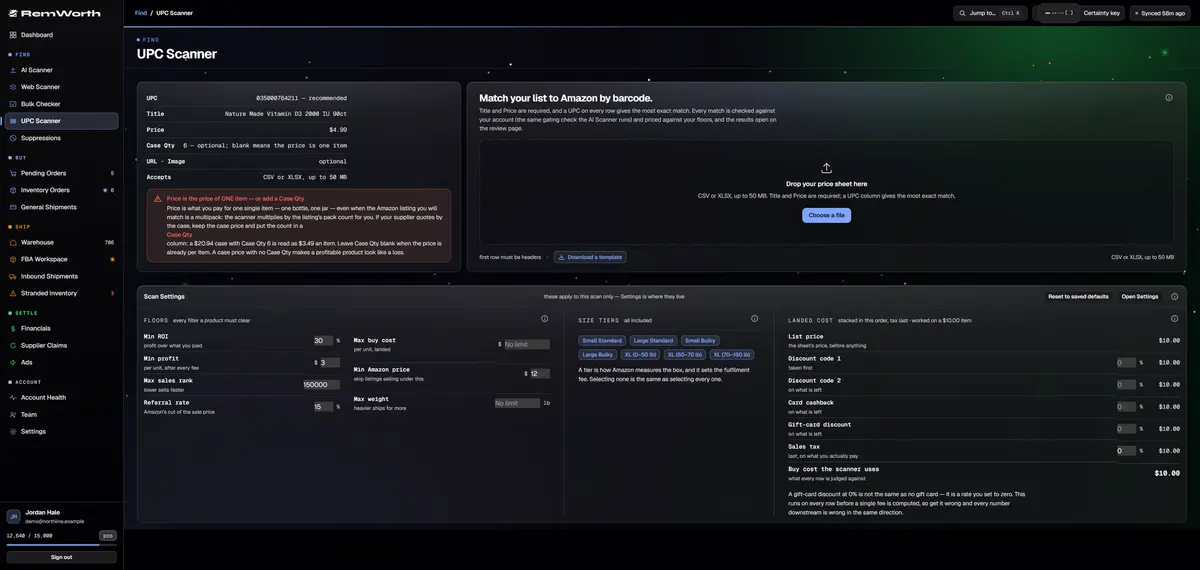
  1. Title and Price on every row, with Price as what you pay for one item. A UPC gives the most exact match. If your supplier quotes by the case, add a Case Qty column: a $20.94 case of 6 is read as $3.49 an item.

  2. CSV or XLSX, up to 50 MB and 5,000 rows. Column order doesn't matter, and there is a template to download. Leaving the page doesn't stop the scan.

  3. Your saved buying rules load: ROI, profit, rank, buy cost, Amazon price, weight and size tier. Change any of them for this scan only. Discount codes, card cashback, gift-card discount and sales tax set the buy cost.

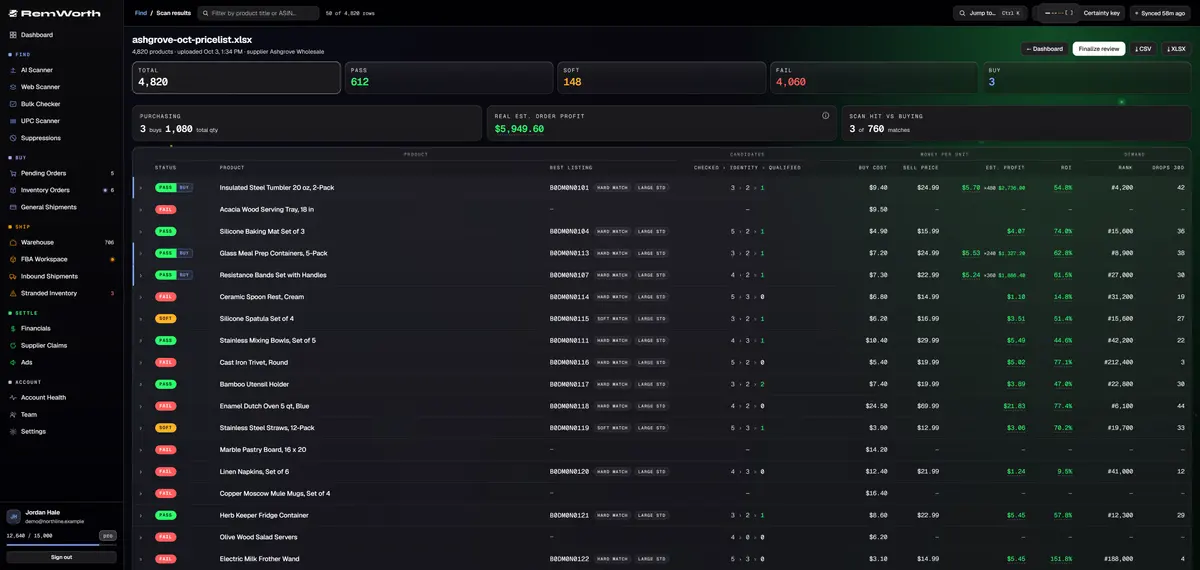
  4. Results open on the same review page as the AI Scanner. Each row comes back pass, soft or fail against your floors, and the page tracks progress while the scan runs.

  5. Your landed buy cost against the current Amazon price, after Amazon's referral and FBA fees. When the listing is a multipack, your unit cost is multiplied by its pack count.

  6. Mark what you'll buy and the order adds up at the top. Finalize the review and the buys go to Pending Orders. Any scan exports to CSV or a formatted Excel workbook.

The UPC Scanner upload screen: the column guide, the drop zone and the scan settings
The scan review page for a demo supplier list: 4,820 rows, 612 pass, 3 marked to buy

Before day one

Get your list ready.

Build the list before your trial starts, and your first scan can run as soon as your Amazon account is connected. UPC scans don't use AI rows, so the UPC Scanner works in the 7-day trial.

The template

The same columns as the template inside the app: UPC, Title, Price, Case Qty and URL. Three made-up sample rows show the format. Replace them with your list.

  • UPC: the barcode, for the most exact match
  • Title and Price: required columns; fill both on every row
  • Case Qty: the count, when Price is for a case
  • URL: your supplier's product page, optional
Download the template (CSV)

The file rules

Check these before you upload.

  • CSV or XLSX, up to 50 MB
  • up to 5,000 rows a file; split a bigger list
  • headers in row 1, spelled as in the template
  • Price is what you pay for one item, or the case price with a Case Qty
  • working in Excel? Upload the .xlsx (one sheet); no need to save a CSV

Day one

Connect your Amazon seller account, upload the file, and review the matches. Each match is checked on your own account: Ungated, Can apply, Restricted, or Checking while Amazon hasn't answered. Have ASINs from somewhere else? The Bulk Checker takes up to 500 at a time.

  • UPC Scanner: up to 5,000 rows a file
  • Bulk Checker: up to 500 ASINs a check
  • both in the 7-day trial; neither uses AI rows
How the Bulk Checker works

What comes back

Every row, matched, priced and flagged.

Match
by UPC, EAN or GTIN barcode, with a title match for rows that have no code or a code that finds nothing
Close calls
when there is no single clear match, the options wait for your one-tap confirm instead of a silent guess
Memory
matches you confirm are remembered for your account and reused when that product turns up in a later scan
Barcode check
each candidate shows the barcodes on file for that listing, with a copy button, and whether your scanned code is one of them
Price and rank
the current Amazon price and sales rank, from your own seller connection
Fees
Amazon's referral and FBA fees, from the rate card
Your cost
two discount codes, card cashback, gift-card discount, sales tax, and case pricing
Pack size
multipacks multiply your unit cost; a listing with no pack size found is priced as one unit and flagged "Pack unverified"
Warnings
hazmat and lithium-battery flags
History
price and rank charts on any candidate

Before you buy

Five checks on a barcode match.

A barcode match finds the listing. These five checks tell you whether to buy it.

  1. Is it the same product?Read the title, brand, size and variant against your supplier's line before you trust the match.
  2. Is it the same pack?A multipack listing multiplies your unit cost. A "Pack unverified" flag means no pack size was found for the listing, so it is priced as one unit. Check it yourself.
  3. Can your account sell it?Read the gating verdict on the match. The UPC Scanner checks every match on your own account: Ungated, Can apply (with a link to Amazon's application when Amazon gives one), Restricted, or Checking. Checking means Amazon hasn't answered yet, so don't count it as sellable. The review page asks Amazon again when you open it.
  4. Any warnings?Read the hazmat and battery flags on the match before you order.
  5. Will the price hold?UPC scan profit uses today's price. Open the price and rank history on the candidate before you count on it. For rank drops and the 90-day average, use the AI Scanner.

Which scanner

UPC Scanner or AI Scanner?

Both open on the same review page, with the same statuses, finalize and exports. They start from different lists and go to different depths.

The jobUPC ScannerAI Scanner
Your list hastitle and price, plus a UPC or EAN wherever you have oneURL, image, title and price; no barcode needed
Gatingthe same check, on your own account at scan timechecked on your own account at scan time
Suppression listnot appliedsuppressed ASINs are skipped
Demand datacurrent price and rankadds rank drops, the 90-day average price, and Amazon's "bought in past month" when shown
Profitat today's priceat today's price and at the 90-day average
Scan rowsnone; included in every planone AI scan row per product row
7-day trialworks in the trialno AI scan rows in the trial

Straight answers

What it doesn't do.

Next in the workflow

Questions

UPC scanning questions

Can you search Amazon by UPC?

Yes. Amazon's catalog carries codes such as UPC and EAN on its listings. To search Amazon by UPC for a whole list, upload it to the UPC Scanner: up to 5,000 rows per file, each looked up through your own seller account.

How do I convert a list of UPCs to ASINs?

Start from the UPC Scanner template, or save your own list as CSV or XLSX with headers in row 1, Title and Price on every row, and the barcode in a column named UPC wherever you have it. Then upload it. Each matched row comes back with its ASIN, price, fees and profit, and the whole scan exports to CSV or Excel. Before you buy, check the title, size and pack count on the listing.

What if a barcode turns up more than one listing?

When there is no single clear match, the UPC Scanner shows you the options and you confirm the right one with one tap. It doesn't pick one silently. Each option shows its pack count and the barcodes on file, so check those before you buy.

How do I find the UPC on an Amazon listing?

In a scan, each candidate shows a UPC on file with a copy button, and its product details list the UPC, EAN and GTIN codes on file for that listing. The card also marks whether your scanned code is one of them. If your row had no barcode and the listing carries several, you can paste a UPC to test it against them.

Does the UPC Scanner check if my account can sell it?

Yes. After matching, every match is checked on your own Amazon account, with the same check the AI Scanner runs. Each comes back Ungated, Can apply (with a link to Amazon's application when Amazon gives one), Restricted, or Checking. Checking means Amazon hasn't answered yet. It is never shown as sellable, and the review page asks Amazon again when you open it. The check uses no AI scan rows. For ASINs from somewhere else, the Bulk Checker takes up to 500 at a time.

Is there a free Amazon scanner app?

Remworth has no free plan. Its phone scanner, Store Mode, runs in your phone's browser, with nothing to install, and comes with Lens. The UPC Scanner is for whole lists; it comes with every plan and works in the 7-day trial (card required).

Does it use AI scan rows? Is there a limit?

It uses no AI scan rows, so it works in the 7-day trial, which includes none. The limit is per file: 5,000 rows and 50 MB. Split a bigger list and upload it in batches.

My spreadsheet dropped the leading zeros from my UPCs. Will they still work?

Usually, yes. The scanner reads 12-digit UPCs, 13-digit EANs and 14-digit GTINs, and restores a UPC that Excel cut short by dropping its leading zeros. A row with no usable code falls back to a title match.
Bring your next barcode list.

Put the list in the template, start the 7-day trial, connect your Amazon seller account, and run your first UPC scan.

Solo $199.99/mo · Pro $349.99/mo · 7 days free, card required

On your phone? Start with just your email. The link we email you works once, on any device, within 7 days, and the app opens once you've picked a plan, added your card and connected your Amazon seller account.

Your Amazon password stays with Amazon. How Remworth connects.

Sources

  1. Catalog Items API reference (Amazon developer docs) Amazon's catalog can be searched by UPC, EAN or GTIN, and each item carries identifiers such as UPC and EAN