Amazon FBA prep and shipping softwarePlan it, pack it, book it, ship it. All from one screen.
Amazon FBA prep is your job now. Amazon stopped offering prep and item labeling for US FBA on January 1, 2026, and since March 31, 2026, resellers must put Amazon barcodes on their units. Remworth runs the shipment from the packing table to Amazon's dock: FNSKU labels, boxes and box labels, placement and carrier options, and a board that follows each shipment to check-in.
Amazon stopped prepping. Resellers label every unit.
Amazon no longer preps or labels for you. Starting January 1, 2026, Amazon's prep and item label services are no longer available for FBA in the US store. Amazon's developer docs say you must prep and label all products before you send them to its US fulfillment network. An Amazon staff reply on the Seller Forums adds that products without proper prep can get damaged, products with missing or defective labels can become untraceable, and these products aren't eligible for reimbursement.
Resellers need Amazon barcodes. Amazon ended commingling on March 31, 2026. Resellers must now use Amazon barcode stickers (the FNSKU label) even when the product already has a manufacturer barcode. Brand representatives in Brand Registry don't need the sticker on products that already carry a manufacturer barcode, and a product with no manufacturer barcode needs an Amazon barcode whoever sells it.
What the unit label looks like. Amazon's packaging and labeling guide on sell.amazon.com sets unit labels at 1 to 2 inches tall and 2 to 3 inches wide, black ink on non-reflective paper with an adhesive back, printed on a laser printer at 300 DPI for best results. Each label shows a scannable barcode, the FNSKU number, the product title and the condition (new or used).
Every box gets its own label. Amazon generates a unique shipping label for each box in a shipment, and each label goes on the box it belongs to. If you don't give Amazon your box contents, Amazon warns there may be receiving defects and manual processing fees. The labels an FBA shipment needs lists the others, from pallet labels to "Sold as set" stickers, and marks the ones Remworth prints.
What each screen does
Three screens. One record for every shipment.
FBA Workspace
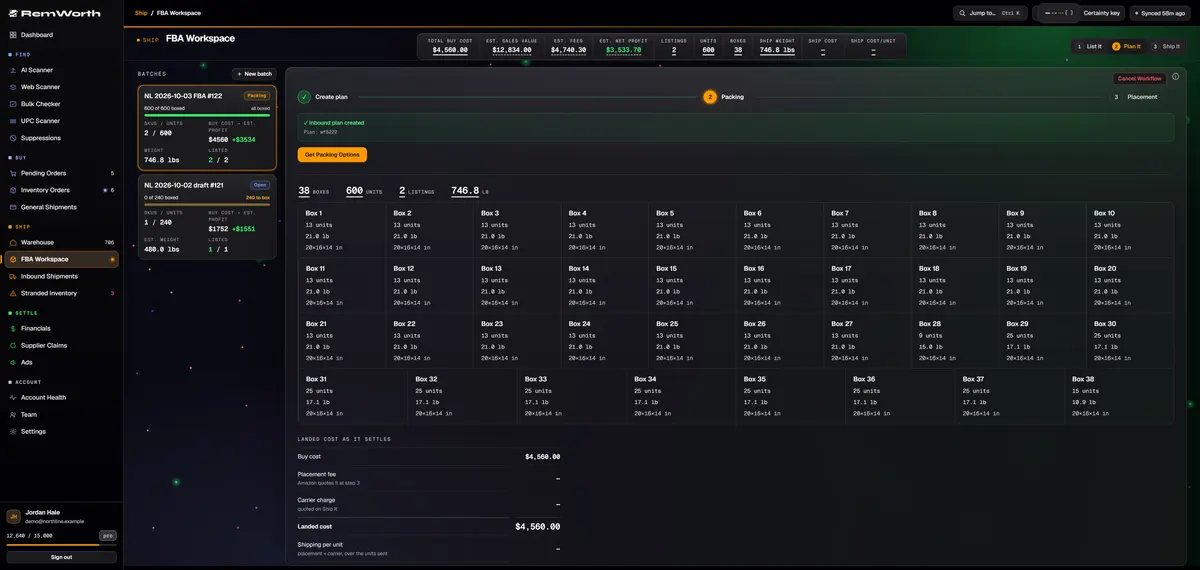
Received units become a batch, and the batch moves through three steps. List it: create missing listings in bulk, get each FNSKU back from Amazon, print the labels. Plan it: Amazon's inbound plan, packing and placement options. Ship it: carrier, delivery window and Amazon's box labels, then mark it shipped.
reusable box-size presets, with dimensions and weights confirmed
box contents sent to Amazon, as a 2D barcode, or left for manual processing
gating checked again when you create the plan, with Amazon's approval link if you need it
Inbound Shipments
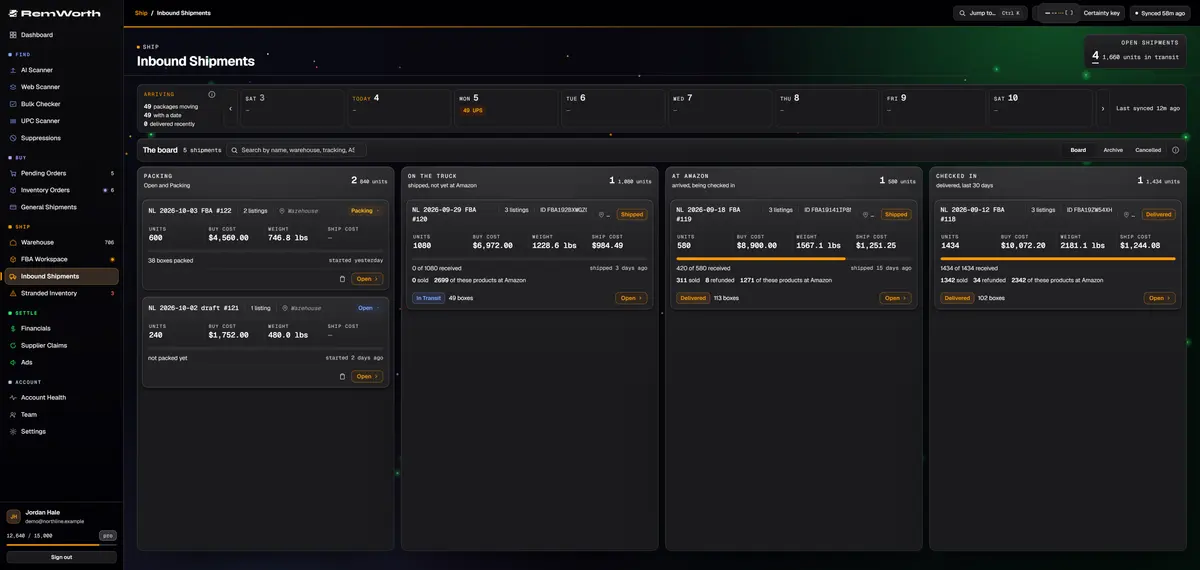
Your inbound shipments sit on one board: Packing, On the truck, At Amazon, Checked in. FBA shipment tracking goes down to the box, and Amazon's check-in counts sync automatically.
shipped vs. received, per product, per shipment
a printable reimbursement claim when Amazon closes a shipment short
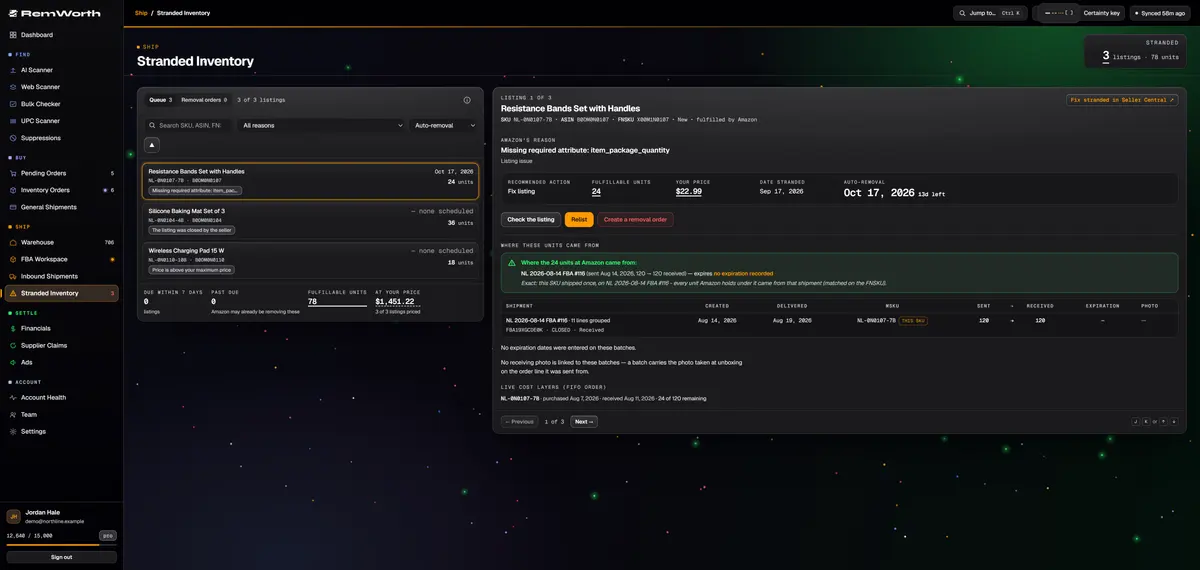
Remworth checks your stranded report and shows Amazon's reason, its recommended action, and a countdown to Amazon's auto-removal date. Relist with a preview Amazon has validated first, or send a removal order from the same screen.
Check Listing shows the live listing's issues, word for word from Amazon
each stranded product traced to the shipments it came in on, marked when the link is a best guess
Return or Disposal removal orders, capped to the stranded count
The same steps as Amazon's Send to Amazon workflow, starting from units you have already received.
Receive the orderCount units in against the purchase order as good, damaged or expired. Each unit's cost is set the moment you receive it.
Send to FBASend received units to a new shipment (small parcel, LTL or full truckload), an open one, or the staging list. The multipack math shows before you commit, and leftover units route to your warehouse.
List itCreate any missing listings in bulk, get each FNSKU back from Amazon, and print the labels. Missing package dimensions are filled in from Amazon's catalog.
Plan itRemworth creates Amazon's inbound plan, sends Amazon your box details, and lists every placement option Amazon offers, with its fee, before you confirm.
Ship itPick an Amazon partnered carrier or your own, choose the delivery window, print Amazon's box labels, and mark the shipment shipped.
Watch it inThe shipment moves across the board until Amazon checks it in. Shipped vs. received shows per product, and your freight lands in your profit numbers.
What travels with the shipment
Inbound shipping cost, counted where it belongs.
Unit cost
each unit's buy cost rides from the purchase order into the shipment
Freight
your carrier charge is split across the units in the shipment automatically, and counted in profit as its own line
Freight edits
change a freight cost after shipping and the numbers follow
Placement fee
shown for every option before you confirm; booked from Amazon's own bill
In Seller Central, go to Inventory, then Shipments, to open Amazon's Send to Amazon workflow. You choose the inventory, pick a shipping mode such as small parcel or pallets, confirm where it goes and which carrier takes it, then print a label for every box. Resellers must also label each unit with an Amazon barcode. Remworth runs the same steps from units you have already received (list it, plan it, ship it) and then follows the shipment until Amazon checks it in.
Does Amazon still prep or label FBA products?
No. Starting January 1, 2026, Amazon's prep and item label services are no longer available for FBA in the US store, and you must prep and label all products before you send them in. An Amazon staff reply says products without proper prep can get damaged, products with missing or defective labels can become untraceable, and these products aren't eligible for reimbursement. Remworth prints the labels and runs the shipment; the physical prep stays with you or your prep center.
Do resellers need FNSKU labels in 2026?
Yes. Amazon ended commingling on March 31, 2026, and resellers must now use Amazon barcode stickers even when the product has a manufacturer barcode. Brand representatives in Brand Registry can skip the sticker on products that already carry a manufacturer barcode. Remworth creates the listing, gets the FNSKU back from Amazon, and prints the labels from your browser, in the 7-day free trial too. The labels a shipment needs are listed on Amazon FNSKU barcode and FBA label requirements.
What size should an FNSKU label be?
Amazon's labeling guide says 1 to 2 inches tall and 2 to 3 inches wide, black ink on non-reflective paper with an adhesive back, printed on a laser printer at 300 DPI for best results, showing the barcode, FNSKU, product title and condition. Remworth prints 2 x 1 inch thermal labels by default (other sizes in Settings) or 30 to a US Letter sheet at 2-5/8 x 1 inch, each with the barcode, FNSKU, condition and title, plus the Best By date when there is one.
Can I avoid Amazon's inbound placement fee?
Amazon decides which placement options you get and what each one costs. Amazon says the fee covers distributing inventory to fulfillment centers close to customers. Some options split a shipment across more destinations, and each can carry fees or discounts that Amazon works out when you create the shipment, weighing things like expected volume, carrier appointment availability and fulfillment speed. The options can change once you give Amazon your box contents. Remworth lists every option Amazon returns, with how many warehouses it ships to and its placement fee, and marks the lowest fee before you confirm. Its staging list holds units back and flags each product when there are enough to pack into identical boxes.
Can I use Remworth with a prep center?
Yes. Remworth isn't a prep center, but it works with one. Save several ship-from addresses so shipments leave from your prep center, invite prep staff with the Prepper role (orders, warehouse and shipments, never your P&L), and count per-unit prep costs like bags, tape, labels and bubble wrap in every profit projection.
How do I fix stranded inventory on Amazon?
Stranded inventory is sellable inventory sitting in a fulfillment center or warehouse that isn't listed for sale, so it can't sell. Amazon's stranded report gives a reason and a recommended action for each listing. Remworth checks that report, counts down to Amazon's auto-removal date, and lets you relist with a preview Amazon has validated or send a Return or Disposal removal order from the same screen.
What happens if Amazon checks in fewer units than I shipped?
Remworth pulls Amazon's check-in counts and shows shipped vs. received for each product in each inbound shipment. When Amazon closes a shipment short, Remworth prints a reimbursement claim with the shipment's details and the supplier invoices you have on file for it. You file the claim with Amazon; Remworth doesn't file it for you.
Run your next shipment through it.
Connect your Amazon account in the 7-day trial, receive an order, and ship it to Amazon from the FBA Workspace.
Solo $199.99/mo · Pro $349.99/mo · 7 days free, card required
On your phone? Start with just your email. The link we email you works once, on any device, within 7 days, and the app opens once you've picked a plan, added your card and connected your Amazon seller account.