Amazon FBA: fix stranded inventoryYour units are at Amazon.
Nobody can buy them.
Stranded inventory is FBA stock in Amazon's warehouses with no active offer, so it isn't for sale. To fix stranded inventory on Amazon FBA, you need Amazon's reason, the deadline and the right fix. Remworth reads Amazon's stranded report, queues each listing with Amazon's reason and its auto-removal date when Amazon has set one, and lets you relist it or file a removal order from the same screen. Nothing goes to Amazon until you approve the preview.
- CheckedAmazon's stranded report, automatically
- ReasonAmazon's own words, per listing
- Deadlineauto-removal countdown, amber at 7 days, red at 2
- FixesRelist or a removal order, preview first
One listing, start to finish
From Amazon's list to a listing that can sell again.
Every stranded listing in Amazon's report, with Amazon's reason on a chip and its fulfillable units. Search by SKU, ASIN, FNSKU or product name, or filter by reason.
The case shows Amazon's stranded reason and status, its recommended action, the units, your price and the date the listing stranded.
Amazon's auto-removal date with the days left. It turns amber at 7 days and red at 2.
The shipments of this SKU you sent through Remworth: sent vs. received, plus any expiration date and receiving photos you recorded. If the SKU shipped more than once, it says so instead of guessing.
Check the listing pulls the live listing's issues in Amazon's words. Relist updates the offer at your price, or re-creates a deleted listing. Amazon validates the preview before you confirm.
Return or Disposal, with your ship-from address prefilled for a Return and quantities capped to Amazon's stranded count. You see the exact file before it goes to Amazon.
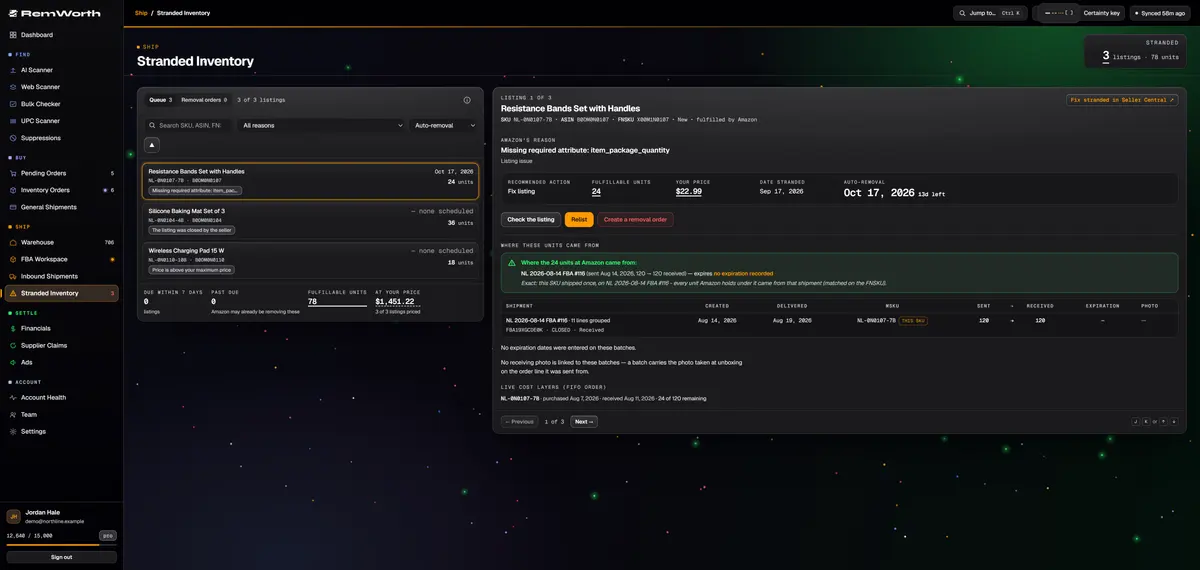
On every stranded listing
Everything you need to decide, on one screen.
- Reason
- Amazon's stranded reason and status, in Amazon's own words
- Next step
- Amazon's recommended action for the listing
- Units
- fulfillable units, plus unsellable, reserved and inbound units when Amazon reports them
- Dates
- the day it stranded, and Amazon's auto-removal date with the days left
- Listing check
- the live listing's issues from Amazon, per SKU, plus a link to Seller Central's own fix page
- Batches
- your shipments of this SKU: sent vs. received, expiration dates and receiving photos
- Freshness
- never an "all clear" until a check has finished; data older than 24 hours is flagged
- Dashboard
- stranded SKUs and units on your Dashboard, valued at your listing price, with the days to the next auto-removal
How to fix stranded inventory
How to fix stranded inventory on Amazon.
This is Amazon's process. It is the same whether you work it in Seller Central or in Remworth.
- Find itAmazon tells you about stranded inventory by email and lists it on the Fix stranded inventory page in Seller Central.
- Read the reasonAmazon says the fix "depends entirely on the reason" the inventory stranded. Causes Amazon names include a deleted or closed listing, a switch from Fulfilled by Amazon to Fulfilled by Merchant, listing issues, infringement concerns and system errors.
- Relist or removeStranded inventory needs one of two fixes: make the listing active again, or remove the units. A removal order returns the units to you or has them disposed of, and Amazon charges removal and disposal fees per unit as each unit is processed.
- Beat the deadlineIf inventory stays stranded, Amazon emails you and later removes it automatically. Amazon's stranded report shows the auto-removal date for each listing it has scheduled.
Straight answers
What it doesn't do.
- It doesn't edit the product data behind a listing error. Relist updates the offer at your price, or re-creates a deleted listing. Fix the listing's details in Seller Central, one click away from the case.
- It won't switch a merchant-fulfilled listing to FBA. If the listing ships from you, Relist only changes the price, and the channel change is yours to make in Seller Central.
- It re-creates a deleted listing only for new-condition units. Relist used items in Seller Central.
- Removal orders here are for stranded units only, Return or Disposal, capped to Amazon's stranded count. Removing healthy stock, or liquidating, is done in Seller Central.
- It only knows shipments you sent through Remworth. Shipments sent before you started, or built in Seller Central, have no batch history here.
Next in the workflow
Questions
Stranded inventory questions
What does stranded inventory mean on Amazon?
Stranded inventory is FBA inventory in Amazon's fulfillment centers that has no active offer, so it isn't available for sale. The units are still there. Amazon's own guide says stranded inventory leads to lost sales, storage costs and lost storage capacity.
Why is my inventory stranded?
Amazon names several causes: you deleted or closed the listing, switched it from Fulfilled by Amazon to Fulfilled by Merchant, the listing has issues, there is an infringement concern, or a system error. In Remworth, each stranded listing shows Amazon's reason word for word, and Check the listing pulls the live listing's issues.
How do I fix stranded inventory on Amazon FBA?
Find the reason, then either make the listing active again or remove the units. In Seller Central that happens on the Fix stranded inventory page. In Remworth, each listing's case has Relist and Create a removal order on the same screen. Both preview first, and if the listing changes before you confirm, the preview is rebuilt and shown again.
What is a stranded inventory listing error?
Listing issues are one of the causes Amazon names: a problem with the listing itself leaves the units without an active offer. Check the listing shows Amazon's issues for that SKU, word for word. Fixes to the listing's details are made in Seller Central, and the case links straight there. When you relist from Remworth, Amazon validates the preview first, so you see its verdict and any issues it raises before you confirm.
What happens if I don't fix stranded inventory?
The units sit unsold, and Amazon's guide says stranded inventory leads to storage costs. If it stays stranded, Amazon emails you and later removes it automatically. The auto-removal date is in Amazon's stranded report, and Remworth counts down to it, turning the date amber at 7 days and red at 2.
How do I remove stranded inventory from Amazon FBA?
Create a removal order to have the units returned to you or disposed of. Amazon charges removal and disposal fees per unit as each unit is processed. In Remworth, Create a removal order on the stranded listing prefills your ship-from address for a Return, caps the quantities to Amazon's stranded count and shows the exact file before it goes. Refresh status then shows Amazon's processing report word for word.
Where is Amazon's stranded inventory report?
In Seller Central, stranded listings are on the Fix stranded inventory page. Remworth pulls the same report from Amazon, and your Dashboard shows how many SKUs and units are stranded.
Can I try it free?
Yes. Stranded Inventory is part of every plan and of the 7-day trial (card required). Connect your Amazon account, and the queue fills after the first completed check.
Find out what's stuck at Amazon.
Connect your Amazon account and see every stranded listing, Amazon's reason and the days left, in one queue.
Solo $199.99/mo · Pro $349.99/mo · 7 days free, card required
On your phone? Start with just your email. The link we email you works once, on any device, within 7 days, and the app opens once you've picked a plan, added your card and connected your Amazon seller account.
Your Amazon password stays with Amazon. How Remworth connects.
Sources
- Amazon Seller Forums: Jameson_Amazon on stranded inventory Amazon staff: stranded inventory has no active offer and is not for sale; reactivate the listing or remove the inventory
- Amazon Seller Forums: Bryce_Amazon, "Resolving Stranded FBA inventory" Amazon staff: the causes, the email notice, the Fix stranded inventory page, and automatic removal of inventory that stays stranded
- Sell on Amazon: Inventory management techniques and best practices stranded inventory leads to lost sales, storage costs and lost storage capacity
- Amazon Seller Forums: News_Amazon, "FBA removal and disposal fees to be charged as units are processed" removal and disposal fees are charged per unit, as each unit is removed or disposed of