Package tracker app and inventory receivingKnow what's coming.
Count what came.
A package tracker app built into your purchase orders. Paste a tracking number and Remworth follows the package to your door. When it lands, count each line in as good, damaged, expired or cancelled, take photos with any phone, and each good unit's cost is locked in that moment. Once it ships to Amazon, Amazon's own check-in counts come back beside what you sent.
- CarriersUPS, FedEx, USPS, OnTrac, CDL Last Mile, Amazon TBA
- Countgood, damaged, expired, cancelled per line
- Photosany phone, by QR code: no app, no login
- At AmazonAmazon's received counts beside what you shipped
From the carrier to the shelf
From a tracking number to a counted order.
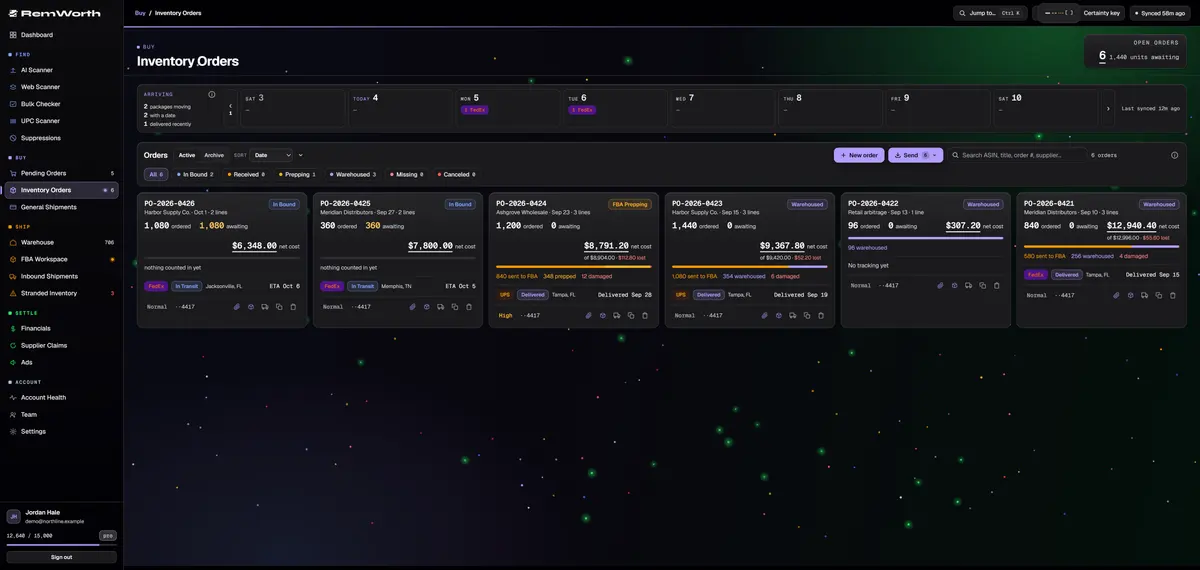
An eight-day calendar across the top of your orders counts packages per day, per carrier. Packages the carrier hasn't dated yet get their own list, so you know which ones to chase.
The carrier is read from the number: UPS, FedEx, USPS, OnTrac, CDL Last Mile or Amazon TBA, and each number links to the carrier's own page. UPS, FedEx, USPS, OnTrac and CDL Last Mile numbers are re-checked automatically for live status, last location and an ETA when the carrier gives one. Amazon TBA numbers get the link only.
Click Receive on a line and log good, damaged, expired and cancelled units. Later deliveries add up against the same order, and cases multiply for you. The card shows what is still awaiting, and its net cost after cancelled, damaged and expired units, with the dollars lost.
Orders move through In Bound, Prepping, Warehoused and Complete on their own as the units move. You flag an order Received or Missing Items when it needs one.
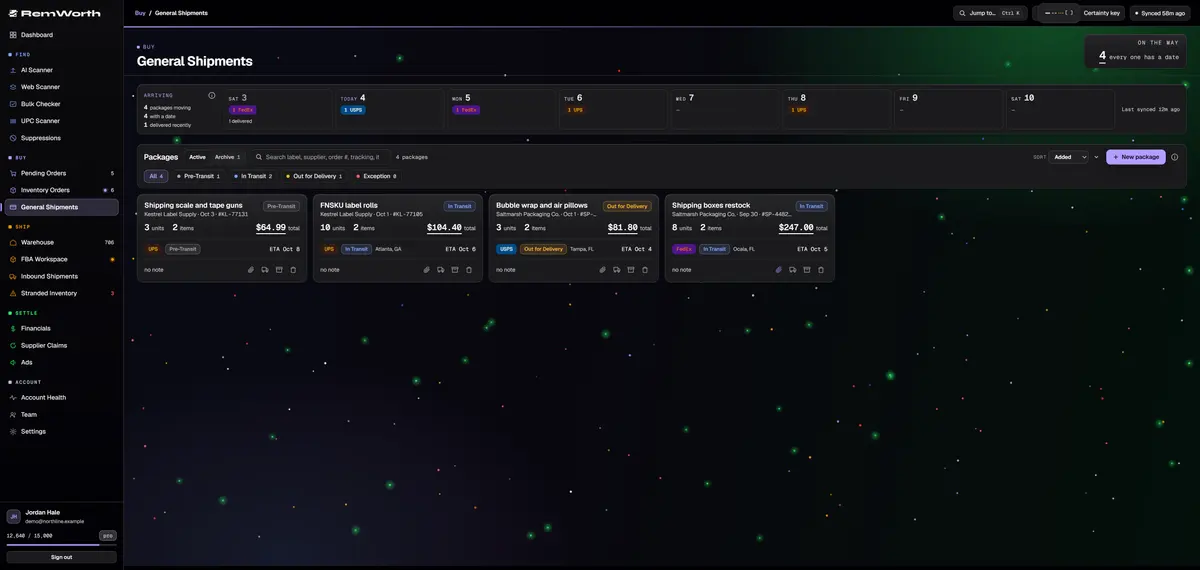
Poly bags, boxes and tape aren't stock, but they still arrive. General Shipments tracks them with the same carrier detection and arrivals calendar, plus itemized costs, a supplier tag and the invoice PDF on each package.
Inventory receiving, line by line
An inventory receiving process with nothing left on a notepad.
The receiving app for your packing table: one pass records the counts, the supplier claims and the cost.
- Count
- good, damaged, expired and cancelled per line; later deliveries add up against the same order
- Cases
- count by the case and it multiplies for you: 3 cases of a 6-pack is 18 units
- Balance
- a live count per line, like 7 of 10 with 3 awaiting, plus a summary for the whole order
- Over-receive
- a warning first, then a deliberate accept when the overage is real
- Cost
- each good unit's cost is locked in when you receive it, one cost layer per supplier order, so the same product bought at two prices books each sale at the right one
- Damage
- damaged or expired units open a supplier refund case by themselves, priced at what you paid and marked Report ASAP
- Photos
- scan a QR code on your screen and any phone becomes the camera: no app, no login, and the link expires on its own
- Shots
- up to six sides and 12 photos per product; queue several products and upload once
- Filing
- photos land on the right order line on their own, even for items on your other open orders; anything unsure waits for your one-tap confirm
- Dates
- per-item expiration countdowns, color-coded; the date is read off the label in your photos, and a date you typed always wins
- Output
- photos rotated, resized and bundled into one PDF per item, stored with the order
- Undo
- Undo receive rolls back exactly the last batch, and every receive carries the name of who did it
Amazon FBA shipment status
What Delivered, Checked in and Receiving mean at Amazon.
Amazon's own definitions, from its guide to tracking FBA shipments. In Remworth, the Inbound Shipments board follows the same trip: packing, on the truck, at Amazon, checked in.
| Amazon's status | What it means |
|---|---|
| Shipped | The carrier picked the shipment up, or you dropped it off. |
| In transit | Amazon has carrier information showing the shipment is moving. |
| Delivered | The shipment is arriving at Amazon's site, or is there but not checked in yet. |
| Checked in | The shipment moved from the facility yard to the dock door and is ready to be unloaded. |
| Receiving | Amazon scanned your first shipment label. Units already received are available for sale. |
| Closed | Amazon confirmed every unit, or the shipment stayed open past Amazon's time limit. |
Source: Amazon, How to track FBA shipments, sell.amazon.com. Checked October 2026. Amazon's guide says FBA shipment times vary with your process and the carrier's timeframes, and run longer in high-volume periods.
Short shipments
Short from the supplier, or short at Amazon.
A supplier short and an Amazon shipment discrepancy are two different problems with two different fixes.
- Short from the supplierCount in what came. The rest stays on the line as awaiting, and a later delivery adds up against the same order. If it isn't coming, flag the order Missing Items and log a supplier claim with the reason "missing".
- Watch Amazon's count come inRemworth reads Amazon's received counts and shows shipped vs. received per product, per shipment. While Amazon is still receiving, a low count is a count in progress, not a shortage.
- Check the Contents tab, then wait for ClosedAmazon's guide: the Contents tab of the Shipment summary shows the difference between expected and located units. Once the shipment is Closed, eligible products get an Action required menu.
- Print the evidenceAmazon asks for proof of inventory ownership and proof of delivery. Print reimbursement claim puts what shipped, what it cost, what Amazon received and the carrier's tracking history in one document, with the supplier invoices on file for those orders added as its last pages.
- File it in Seller CentralFrom the Action required menu, confirm you sent a different count or ask Amazon to research the difference. Remworth doesn't file it for you. Amazon's guide says reimbursements show under Reports, then Fulfillment.
- Tell Remworth what happenedWhen Amazon closes a shipment short, your stock record follows Amazon's count and the shipment asks you why. As the owner, you answer for the short units: they never shipped (back in your stock, nothing booked), or, from the date the shipment shows, write them off as lost (their cost becomes an expense).
Straight answers
What it doesn't do.
- Amazon TBA numbers are recognized and linked to Amazon's page, but they don't get live status, a last location or an ETA.
- It doesn't file Amazon reconciliation requests or reimbursement claims. It prints the evidence; you file in Seller Central.
- It doesn't contact your supplier. It opens and tracks the refund case and flags refunds that sit at approved too long; you make the contact.
- Units a supplier never sent don't open a claim by themselves. Log a short shipment claim on Supplier Claims with the reason "missing".
- There is no spreadsheet receiving template to download. The purchase order on screen is the checklist you count against.
Next in the workflow
Questions
Receiving and tracking questions
Is Remworth a package tracker app?
Yes, for the packages your business buys. Paste a tracking number on a purchase order, or on a supplies package in General Shipments, and the carrier is read from the number. UPS, FedEx, USPS, OnTrac and CDL Last Mile numbers get live status, last location and an ETA when the carrier gives one. Amazon TBA numbers get a link to Amazon's page. Remworth runs in your browser, so there is nothing to install.
What does "Receiving" mean on an Amazon FBA shipment?
It means Amazon has started counting your units in. Amazon's guide says a shipment enters Receiving when Amazon scans your first shipment label, and units already received are available for sale. It turns Closed when Amazon has confirmed every unit, or when the shipment has stayed open past Amazon's time limit. Remworth reads Amazon's received counts, so you can watch the count fill in.
My FBA shipment says Delivered but nothing has been received. Is it stuck?
Not necessarily. In Amazon's terms, Delivered means the shipment is arriving at Amazon's site, or is there but not checked in yet. Checked in means it moved from the yard to the dock door and is ready to be unloaded, and Receiving starts with the first label scan. Amazon's guide says FBA shipment times vary with your process and the carrier, and run longer in high-volume periods.
What happens if Amazon checks in fewer units than I shipped?
Wait until Amazon is done: while a shipment is still receiving, a low count is a count in progress. Amazon's guide says the Contents tab of the Shipment summary shows the difference between expected and located units, and once the shipment is Closed, eligible products get an Action required menu. From there you confirm you sent a different count or ask Amazon to research it, with proof of inventory ownership and proof of delivery. Remworth shows shipped vs. received per product and prints that evidence. It doesn't file for you.
What is short shipping?
A short shipment has fewer units than it should. From a supplier, that's fewer than your purchase order; at Amazon, it's fewer checked in than you sent. In Remworth, units a supplier didn't send stay on the order line as awaiting, and you can flag the order Missing Items and log a supplier claim for them.
How do I receive inventory against a purchase order?
Open the order and click Receive on a line. Enter good, damaged, expired and cancelled units (if the line has a pack size, tick "in cases" to count by the case) and confirm the count. Do the same for each delivery; the line shows what's already in and what's left to count. Damaged and expired units open a supplier refund case, and each good unit's cost is locked in.
How do I keep track of inventory and purchases for online arbitrage?
Track each buy at the order level: supplier, order number, card, cashback portal, unit cost and pack size. Record what actually arrived, and keep each order's cost separate so every sale carries the right cost. In Remworth, marking a buy as ordered creates the purchase order (or adds to the one with the same order number) with the order number, card and cashback portal on it. Tracking, receiving and a cost layer per supplier order follow from there.
Can my prep team or warehouse staff receive without seeing my profit?
Yes. Give them the Prepper role: it receives, preps and ships, and never sees the P&L. Every receive carries the name of the person who did it, and an owner can undo any team member's receive.
Count your next delivery in Remworth.
Start the 7-day free trial (card required), paste a tracking number, and receive your next order against its purchase order.
Solo $199.99/mo · Pro $349.99/mo · 7 days free, card required
On your phone? Start with just your email. The link we email you works once, on any device, within 7 days, and the app opens once you've picked a plan, added your card and connected your Amazon seller account.
Your Amazon password stays with Amazon. How Remworth connects.
Sources
- Amazon: How to track FBA shipments shipment statuses; the Contents tab and the Action required menu once Closed; proof of ownership and delivery; where reimbursements show
- Amazon Selling Partner API: Fulfillment Inbound API FAQ Amazon's definitions of Delivered, Checked in, Receiving and Closed