What is an ASINAmazon's code for every product,
and how to find it from a barcode.
An ASIN (Amazon Standard Identification Number) is the 10-character code of letters and numbers that Amazon gives each product in its catalog, such as B07FZ8S74R. To sell a product that is already on Amazon, you add your offer to its existing ASIN. This guide shows where to find one, how it differs from a UPC, SKU and FNSKU, and how to turn a supplier's barcode list into ASINs.
- Stands forAmazon Standard Identification Number
- Format10 letters and numbers
- Starts withusually B0; a book's starts with a number
- In the URLright after /dp/
What an ASIN is
ASIN stands for Amazon Standard Identification Number. Amazon describes it as a unique 10-character code of letters and numbers.
Most start with B0. For books, the ASIN begins with a number. Amazon's own examples are B07FZ8S74R and 0451524934.
Amazon assigns the ASIN, not the seller. When a new product detail page is created in the Amazon store, Amazon gives it a new ASIN, and each product listing has its own.
Why it matters to a reseller
Amazon's ASIN creation policy puts it simply: to sell a product that is already available on Amazon, you add an offer to the existing ASIN. Amazon's seller blog notes that this is often the case for resellers.
So for wholesale and arbitrage sellers, the ASIN is the listing you are joining. Find the right one first. Every later check, from fees to whether your account can sell it, hangs on it.
How to find an ASIN
Amazon names three places to look.
- The web address. On a product page, the ASIN comes right after "/dp/" in the URL.
- The product details. Scroll down to the product information or details section of the page, where the ASIN is usually listed.
- Manage All Inventory. In Seller Central, your own listings show their ASINs on the Manage All Inventory page.
Find the ASIN from a barcode
When you have the product, or its UPC, and need the ASIN:
- Amazon Seller app. Free on iPhone and Android. Scan a barcode, or point the camera at a product, to see whether it is already in the Amazon store.
- Seller Central. Go to Catalog, then Add Products, and click Product IDs. Enter the product's GTIN, such as its UPC or EAN, and click Submit to see whether an ASIN already exists.
- A whole supplier list. Amazon's catalog API lets software search by UPC, EAN, GTIN, ISBN or JAN as well as by ASIN. Remworth's UPC to ASIN scanner looks up each row of a supplier file by its barcode, or by its title when the row has none, through your own seller account: up to 5,000 rows a file.
ASIN vs UPC, SKU and FNSKU
One product can carry four kinds of code. Each has a different owner and a different job.
| Code | Who gives it | What it identifies | Where you see it |
|---|---|---|---|
| ASIN | Amazon, when a product detail page is created | one product in Amazon's catalog; 10 letters and numbers | the listing's web address and product details; sellers of that product add their offers to it |
| UPC, EAN, ISBN, JAN (GTINs) | the manufacturer or brand owner, through GS1 | the product wherever it is sold; a GTIN is up to 14 digits, and an ISBN is for books | the barcode printed on the package |
| SKU | you, or Amazon creates one for you | your own inventory; usually 8 to 10 letters and numbers | your listings; two sellers of one product have different SKUs but the same UPC |
| FNSKU | Amazon; you print the label from your seller account | your units in Amazon's fulfillment network; an Amazon barcode starts with X | the label on each unit you send to FBA |
Sources: Amazon's ASIN, GTIN and SKU guides on sell.amazon.com, and the FBA barcode help pages in Seller Central.
Since March 31, 2026: resellers label with the FNSKU
Amazon's FBA barcode page says that as of March 31, 2026, resellers are required to use Amazon barcodes for products even if they have a manufacturer barcode. Brand owners can keep using manufacturer barcodes without stickers.
So the UPC on the package finds you the ASIN. The FNSKU label is the barcode Amazon uses to track each unit you send in. Amazon also says each FNSKU must belong to one unique product: each size or color needs its own, and so does each condition, such as Used - Like New and Used - Good. More in FNSKU labels are now required for resellers.
One product, several ASINs: sizes, colors and packs
Amazon gives each variation of a product, such as each size or color, its own ASIN. These child ASINs sit under a parent, so shoppers can choose a size or color on one product page.
Packs work the same way. Amazon's ASIN creation policy says a new ASIN must be a product configuration the brand owner or manufacturer created, and that sellers should not list non-standard multipacks that the brand owner or manufacturer didn't create. A manufacturer's 6-pack can therefore have a listing of its own, separate from the single.
What that means when you buy: match the exact size, color and pack count your supplier sells. If the listing is a 6-pack and your supplier sells singles, one sale on that listing uses six of your units.
Do resellers ever create an ASIN?
Often they don't need to. If the product is already in Amazon's catalog, which Amazon says is often the case for resellers, you match your offer to the existing listing. A new ASIN is for a product that isn't in the Amazon store yet, and you get one by creating a product detail page.
Amazon's rules for a new ASIN, from its ASIN creation policy and seller blog:
- It must be an active product from the brand owner or manufacturer, in a configuration they created. Not a discontinued product past its useful life.
- No non-standard multipacks that the brand owner or manufacturer didn't create. Bundles follow Amazon's Product Bundling policy.
- If the brand is enrolled in Amazon Brand Registry, you need to be a Brand Representative, or a reseller the brand has authorized, to list it through the standard process.
- Amazon limits how many new ASINs you can create each week until you build a sales history. Its help page gives a weekly creation limit of 2,000 ASINs.
- A product with no manufacturer barcode: a brand approved for Brand Registry can apply for a GTIN exemption. Makers who want their own barcodes on the packaging apply to GS1 for a UPC.
Turning a supplier's UPC list into ASINs
When a supplier's price list carries UPCs, each line needs its ASIN before you can price it on Amazon. For a long list, that means a bulk lookup.
Whatever does the lookup, check five things before you trust a match:
- The same product. Brand, size, color and variant on the listing match your supplier's line.
- The same pack. A single and a multipack are different listings. Price the pack the listing sells.
- The barcode is on the listing. Amazon's catalog lists the codes on file for each ASIN, such as its UPC and EAN. The code you looked up should be one of them.
- Your account can sell it. Search the product in Add Products in Seller Central. Amazon shows "Sell this product", "Apply to sell" or "Not Available". Restrictions can apply to a single ASIN, a brand, a brand within a category, or a whole category or sub-category.
- The numbers work. Amazon's referral and FBA fees at the price the listing sells for, against what you pay.
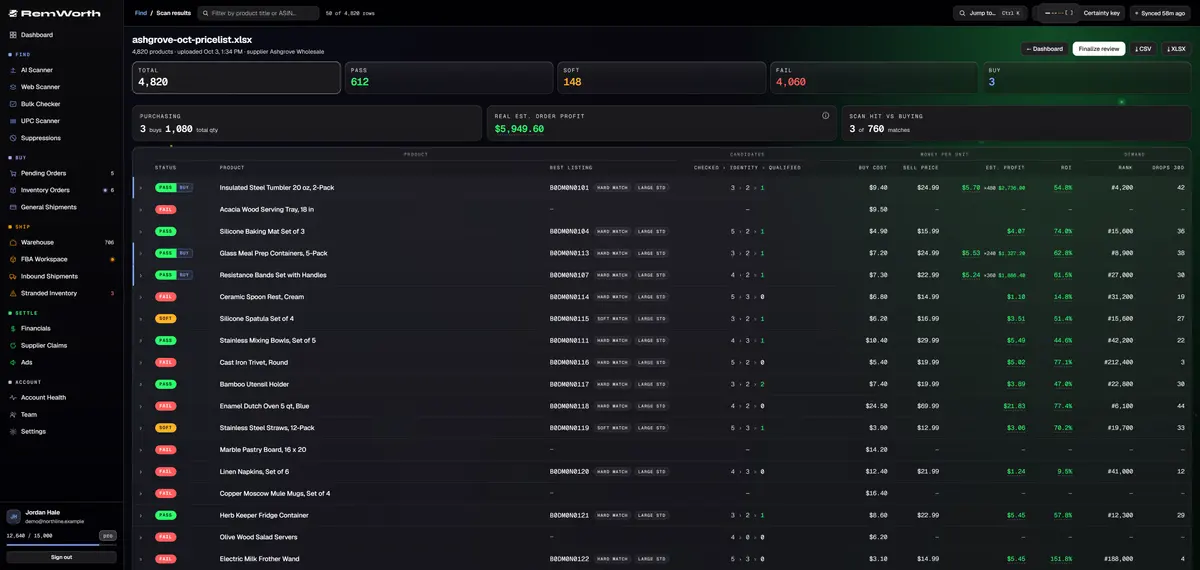
Remworth's UPC Scanner does the lookup for a whole list and shows the product, pack, barcode and fee checks on one review page. The same page shows whether your own account can sell each match: Ungated, Can apply, Restricted, or Checking if Amazon hasn't answered yet. See it step by step.
In Remworth
A barcode list to ASINs, in the UPC Scanner.
The UPC Scanner does the barcode-to-ASIN step for a whole supplier list. It is included in every plan, uses no AI scan rows and works in the 7-day free trial (card required).
- Save the listCSV or XLSX, up to 5,000 rows and 50 MB. Title and Price are required, with the UPC wherever you have it. Price is what you pay for one item, or keep a case price and add a Case Qty column. There is a template to download.
- Upload itEach row is looked up on Amazon by its UPC, EAN or GTIN, through your own seller account. Rows with no code, or a code that finds nothing, fall back to a title search. A UPC that lost its leading zeros in Excel is still read as a UPC.
- Confirm the close callsWhen there is no single clear match, the options wait for your one-tap confirm instead of a silent guess. Matches you confirm are remembered for your next scan.
- Check the barcode and the packEach match shows its ASIN and the UPC on file, each with a copy button, and whether your scanned code is one of the barcodes on that listing. A multipack listing multiplies your unit cost by its pack count. "Pack unverified" means no pack size was found, so it is priced as one unit.
- Read the moneyEach match carries the current Amazon price and rank, Amazon's referral and FBA fees, and your profit and ROI against your own buying rules, with hazmat and battery flags.
- Check gating, then buyEach match is checked against your own account: Ungated, Can apply, Restricted, or Checking if Amazon hasn't answered yet. For any still Checking, the review page asks Amazon again when you open it. Mark your buys and finalize, and they go to Pending Orders. Any scan exports to CSV or Excel.
Next
Questions
ASIN questions
What does ASIN stand for?
Amazon Standard Identification Number. It is the 10-character code of letters and numbers that Amazon gives each product in its catalog. Amazon's example is B07FZ8S74R.
How do I find the ASIN of a product on Amazon?
Amazon names three places: the product page's web address, right after /dp/; the product information or details section further down the page; and, for your own listings, the Manage All Inventory page in Seller Central.
Is an ASIN the same as a UPC?
No. A UPC is a manufacturer barcode that identifies a product wherever it is sold. An ASIN is Amazon's own code for a product in its catalog, and Amazon says it can't identify a product outside Amazon. You use the UPC on the package to find the ASIN.
What is the difference between an ASIN, a SKU and an FNSKU?
The ASIN identifies the product in Amazon's catalog, and sellers of that product add their offers to it. The SKU is your own code for your own inventory; Amazon can create one for you. The FNSKU is the Amazon barcode label, starting with X, that goes on units you send to FBA. Since March 31, 2026, Amazon requires resellers to use it even when the product has a UPC.
Do I need to create an ASIN to sell on Amazon?
Not if the product is already in Amazon's catalog, which Amazon says is often the case for resellers: you add your offer to the existing ASIN. New ASINs are for products not yet in the Amazon store, and Amazon limits who can create them and how many each week.
Why does one product have more than one ASIN?
Amazon gives each variation, such as each size or color, its own ASIN under a parent listing. A multipack the manufacturer created can also have its own listing, separate from the single. Match the exact version and pack count your supplier sells.
How do I convert a list of UPCs to ASINs?
For one product, scan its barcode with Amazon's free Amazon Seller app, or enter the code under Catalog > Add Products > Product IDs in Seller Central. For a whole supplier list, upload it to Remworth's UPC Scanner: up to 5,000 rows a file, each looked up by its barcode through your own seller account and priced with Amazon's fees. It works in the 7-day trial (card required).
Does the ASIN tell me whether I can sell a product?
No. Some products, brands and categories need Amazon's approval, and that depends on your own account. Amazon's Add Products page shows Sell this product, Apply to sell or Not Available. For a list, paste up to 500 ASINs into Remworth's Bulk Checker for a verdict from your own account: Ungated, Can apply or Restricted.
Got a list of UPCs? Get the ASINs.
Upload up to 5,000 barcodes. The UPC Scanner matches them to ASINs and prices every match with Amazon's fees and your costs.
Solo $199.99/mo · Pro $349.99/mo · 7 days free, card required
On your phone? Start with just your email. The link we email you works once, on any device, within 7 days, and the app opens once you've picked a plan, added your card and connected your Amazon seller account.
Your Amazon password stays with Amazon. How Remworth connects.
Sources
- Amazon, Sell on Amazon blog: "Understanding ASINs: Your guide to Amazon's product identification system" (June 4, 2025) what ASIN stands for; a unique 10-character alphanumeric code, usually starting B0, a number for books; the examples B07FZ8S74R and 0451524934; the URL after /dp/, the product information section, Manage All Inventory; a new product detail page gets a new ASIN
- Amazon, Sell on Amazon blog: "What are product IDs or GTINs?" (January 11, 2025) a GTIN is up to 14 digits and usually a scannable barcode; UPC, EAN, ISBN (books) and JAN; GTINs for new products come from GS1; GTIN exemption; an ASIN can't identify a product outside Amazon
- Amazon, Sell on Amazon blog: "What is a SKU—and how does it help ecommerce sellers?" (May 20, 2025) a SKU is your own inventory code, usually 8 to 10 letters and numbers; Amazon can create one for you; each listing has a unique ASIN; two sellers of one product have different SKUs but the same UPC
- Amazon, Sell on Amazon blog: "How to create a new ASIN on Amazon" (September 28, 2025) resellers often match an existing listing; Catalog > Add Products > Product IDs to check for an ASIN; Brand Registry brands; each variation gets its own ASIN; a weekly limit on new ASINs until you have a sales history
- Amazon Seller Central help: ASIN creation policy (G201844590) add an offer to the existing ASIN; requirements for a new ASIN; no non-standard multipacks; weekly creation limit of 2,000 ASINs; parent and child ASINs in variation families
- Amazon Seller Central help: FBA barcode requirements (G201100910) manufacturer barcodes (UPC, EAN, JAN, ISBN) and Amazon barcodes (FNSKU labels that start with an X); from March 31, 2026 resellers use Amazon barcodes even when a manufacturer barcode exists; GTIN exemption; GS1 UPCs for manufacturers
- Amazon Seller Central help: Product packaging requirements (G200141500) each FNSKU must correspond to one unique product, with its own FNSKU for each size, color and condition
- Amazon Seller Central help: Categories and products that require approval (G200333160) Add Products shows Sell this product, Apply to sell or Not Available; restrictions on individual ASINs, brands, or brands within a category
- Amazon Seller app (sell.amazon.com) free on iPhone and Android; scan a barcode or point the camera at a product to see whether it is already in the Amazon store
- Amazon SP-API docs: Catalog Items API reference the catalog can be searched by ASIN, EAN, GTIN, ISBN, JAN, MINSAN, SKU or UPC; each item lists its identifiers in the Amazon catalog, such as UPC and EAN