Purchase order tracker for Amazon sellersFrom buy list to purchase order.
Nothing re-typed.
A purchase order tracker that starts where your sourcing ends. Finalize a scan review and your buys wait on Pending Orders, grouped by supplier. Tick what you're buying, enter the supplier's order number once, and the purchase order exists, every line and cost carried over. Then paste the tracking numbers to follow it to your door, and count it in.
- Starts fromany finalized scan review, or New order
- One entryorder #, card and cashback for every ticked line
- Each orderordered, awaiting and net cost after losses
- Trackinglive from UPS, FedEx, USPS, OnTrac and CDL
Buy list to purchase order
From the buys you picked to the boxes at your door.
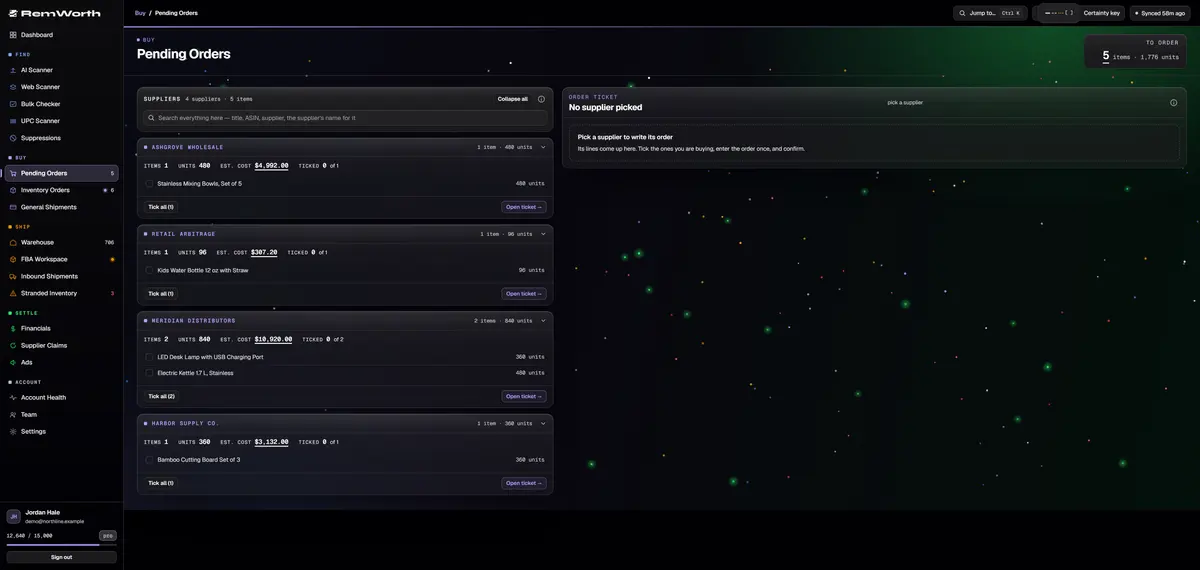
Finalize a scan review and every item you marked buy lands on Pending Orders with its ASIN, source link, cost and target prices filled in. One card per supplier.
Each supplier shows its items, its units and what they come to at your buy costs. Lines with no cost are flagged. The meter up top counts everything still to order.
Open a supplier's ticket and tick the lines you're buying. Enter the order number, card and cashback portal once for all of them, then confirm. Buy 5 of 10 and the other 5 stay on the list.
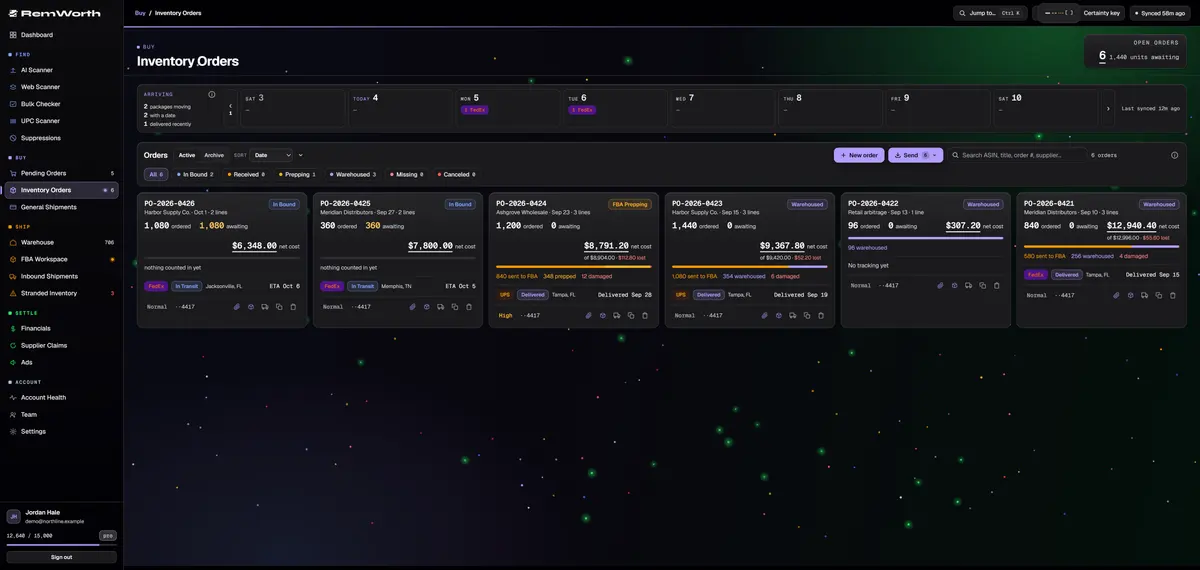
Confirming creates the purchase order, or adds to it when that order number already exists. Search by order number, supplier, ASIN or title, and filter by status. Orders you placed outside a scan go in with New order.
Each card shows units ordered, units still awaiting, and the net cost after cancelled, damaged and expired units, with the dollars lost. The bar tracks units prepped, warehoused and sent to FBA.
Paste a tracking number and the carrier is read from it. UPS, FedEx, USPS, OnTrac and CDL Last Mile report live status, and the week row counts what's arriving each day, by carrier.
What a purchase order carries
Every wholesale purchase order, with its paper trail.
Purchase order management that starts the moment you decide to buy, and stays with the order until the last unit is dealt with.
- Supplier
- typed or picked from your supplier list, with acronyms, so names stay the same everywhere
- Order number
- as the supplier prints it; lines recorded under the same number join that order
- Lines
- ASIN, title, quantity, unit buy cost, pack size, tax code, and list, min and max price, carried over from the buy list
- Paid with
- the card (a label and the last 4 only), the cashback portal and your account at the distributor
- Invoice
- attach the supplier's PDF invoice to the order
- Tracking
- every number on the order, linked to the carrier's own page when the carrier is recognized, Amazon TBA included
- Status
- moves with the work: In Bound, FBA Prepping, Warehoused, Complete, Canceled; you flag Received or Missing Items
- Net cost
- what the order is worth after cancelled, damaged and expired units, with the dollars lost
- Archive
- finished orders move there on their own, grouped by year with annual spend
- Who did it
- order, receiving and warehouse changes record who made them
Spreadsheet or tracker
Still tracking purchase orders in a spreadsheet?
A purchase order template in Excel holds what you type into it. Remworth fills the order from work you already did.
Price list to purchase order
From a supplier price list to a purchase order.
- Scan the listUpload the supplier's price list to the AI Scanner, or a barcode list to the UPC Scanner, and mark what you'll buy.
- Finalize the reviewYour buys land on Pending Orders under that supplier, with cost and target prices filled in.
- Set quantities, check costsType how many you want. Fix a unit buy cost now: a cost corrected before you receive carries everywhere.
- Place the orderOn the supplier's website, by email or by phone, the way you buy today. Remworth doesn't send it for you.
- Record itTick the lines, enter the supplier's order number, card and cashback portal once, and confirm. The purchase order appears on Inventory Orders.
- Track it and count it inPaste the tracking numbers. When the boxes arrive, receive against the order: good, damaged, expired or cancelled, line by line.
Straight answers
What it doesn't do.
- It doesn't place orders or send purchase orders to your suppliers. You buy the way you do now and record the order number.
- It doesn't set reorder points or suggest how many to buy. For a reorder list, the AI Scanner's Restock rule keeps only products you already sell that will run out within the days you set.
- It doesn't import an old tracker spreadsheet, and it doesn't export the order list to one.
- Amazon TBA tracking numbers are recognized and linked, but get no live status. Live status comes from UPS, FedEx, USPS, OnTrac and CDL Last Mile.
Next in the workflow
Questions
Purchase order questions
What should a purchase order tracker include?
At least the supplier, the order number and date, each line's quantity and unit cost, how you paid, the tracking numbers, and what actually arrived. Remworth's purchase orders carry all of that, plus the cashback portal, the supplier's PDF invoice when you attach it, and the net cost after damaged, expired and cancelled units.
How do I keep track of inventory and purchases for online arbitrage?
Track each buy at the order level: the store or supplier, order number, card, cashback portal, cost per unit and pack size. Then record what actually arrived (good, damaged or expired) and keep each order's cost separate, so every sale is costed at what that batch cost. In Remworth, Web Scanner buys reach Pending Orders with the retailer as the supplier, and the same purchase order flow takes it from there.
Can I just use a purchase order tracker template in Excel?
Yes, for a handful of orders. A template holds what you type: you copy the buys in, work out pack costs, update a received column and remember which card you used. Remworth fills the order from your finalized scan review, carries the card and cashback, and counts deliveries in against it. It doesn't import an old tracker sheet, so start with your next order.
How do I receive inventory against a purchase order?
Open the order, click Receive on a line, and log how many arrived good, damaged, expired or cancelled. Count by the case and it multiplies for you. Several deliveries add up against the same line, each line shows what is still awaiting, and a count over what you ordered gets a warning first.
Do purchase orders have to come from a scan?
No. New order on Inventory Orders takes an order you placed anywhere, like a trade show or a phone order. Type the lines by hand or pick them from Pending Orders, add the tracking numbers, and it runs through the same receiving.
Can I order part of a line now and the rest later?
Yes. Record 5 of 10 and the other 5 stay on Pending Orders with an ordered-of-total tally. Order them later, or close out the rest if you're done.
What happens when a supplier cancels units or sends damaged ones?
Log them when you count the order in. The order's net cost drops to what it is really worth and shows the dollars lost. Damaged and expired units open a supplier refund case priced at what you paid. Cancelled units can be re-ordered from the line with just the new order number, with the card and cashback carried over.
Is this the same as an Amazon purchase order?
No. In Amazon's developer documentation, purchase orders belong to vendors: the Vendor Orders API is for vendors only, who use it to receive purchase orders and to accept or reject them. Remworth is for third-party sellers on amazon.com, and the purchase orders it tracks are the ones you place with your own suppliers.
Record your next supplier order here.
Start the 7-day trial, send a UPC Scanner list to Pending Orders, or enter an order by hand with New order.
Solo $199.99/mo · Pro $349.99/mo · 7 days free, card required
On your phone? Start with just your email. The link we email you works once, on any device, within 7 days, and the app opens once you've picked a plan, added your card and connected your Amazon seller account.
Your Amazon password stays with Amazon. How Remworth connects.