Amazon to Amazon arbitrage and online arbitrage softwareBuy it online.
Know it pays on Amazon first.
Remworth helps amazon.com resellers check online arbitrage (OA) and Amazon to Amazon arbitrage buys before they spend. Start from products that already sell and let the Web Scanner find them at major retailers, or check a deal on the Amazon page itself with Lens. The buys you keep then run through one order list, receiving, labels and your shipment to Amazon.
Solo $199.99/mo · Pro $349.99/mo · 7 days free, card required
- Reverse sourcingAmazon products in, retail sources out
- Localset a ZIP to include stores near you
- Gatingevery scanner, Lens and Bulk Checker ask Amazon about your account
- Marketplaceamazon.com only
Online arbitrage software
Three ways to work an OA list. | One buy list out.
Amazon to Amazon arbitrage
Buying on Amazon to resell on Amazon.
Amazon to Amazon arbitrage means buying a product on Amazon while its price is down, then reselling it on Amazon once the price comes back. It is online arbitrage with Amazon as the store, and the whole bet is price history: the price has to be back up by the time your units are on sale.
Remworth does this part with Lens, a Chrome extension for amazon.com pages. It comes with Pro, or costs $49.99 a month on its own or added to a paid Solo plan. Open a product and Lens shows:
- the price and rank history chart, from one day to the full history, with no second data subscription to buy
- net profit, ROI and margin, recalculated as you type a sell price and the price you would pay
- a breakeven price and the most you can pay to hit your own profit, ROI and margin targets
- rank and Amazon's own "bought in past month" figure
- whether your own account can sell it, asked of Amazon as soon as you open the page
- a hazmat or battery flag and, on a Solo or Pro account, whether you've sold it before, with units on hand, units sold and the last-sold date
On search results and seller storefronts, Lens adds a strip under every product: rank, 30-day rank drops, monthly sold, FBA offer count, and the FBA fee at the listing's current price. It shows no ROI there, because it doesn't know your cost yet.
Bought it? Add the order by hand with its ASIN, no scan needed, and it goes through the same receiving, labeling and FBA steps as everything else.
What Lens doesn't do is watch prices for you: there are no price-drop alerts. And Remworth is amazon.com only, so it doesn't cover buying on one Amazon marketplace to sell on another.
Your first week
Your first week of OA in Remworth.
The 7-day trial runs on your real Amazon account. It comes with no AI scan rows, so the week starts with the two tools that need none. Start the 7-day trial
- Day 1: sign up and connectEmail first, card at the plan step, nothing charged for 7 days. Then connect your amazon.com seller account; you approve it in Seller Central.
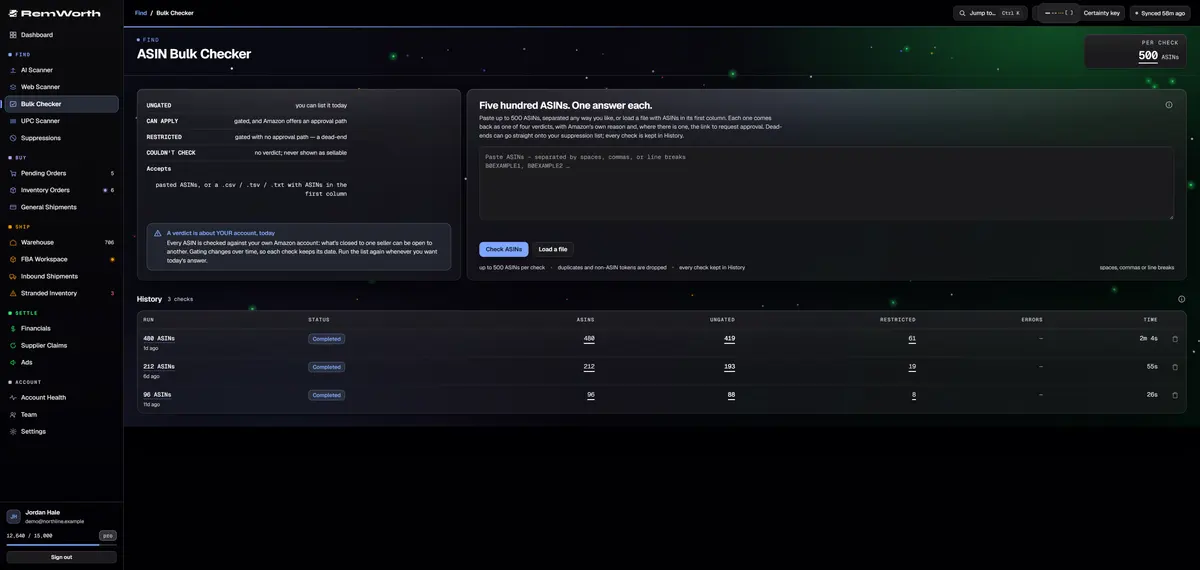
- Day 1: gate-check your leadsTrial task: paste up to 500 ASINs from your lead list into the Bulk Checker. Each comes back Ungated, Can apply, Restricted or Couldn't check, from your own account.
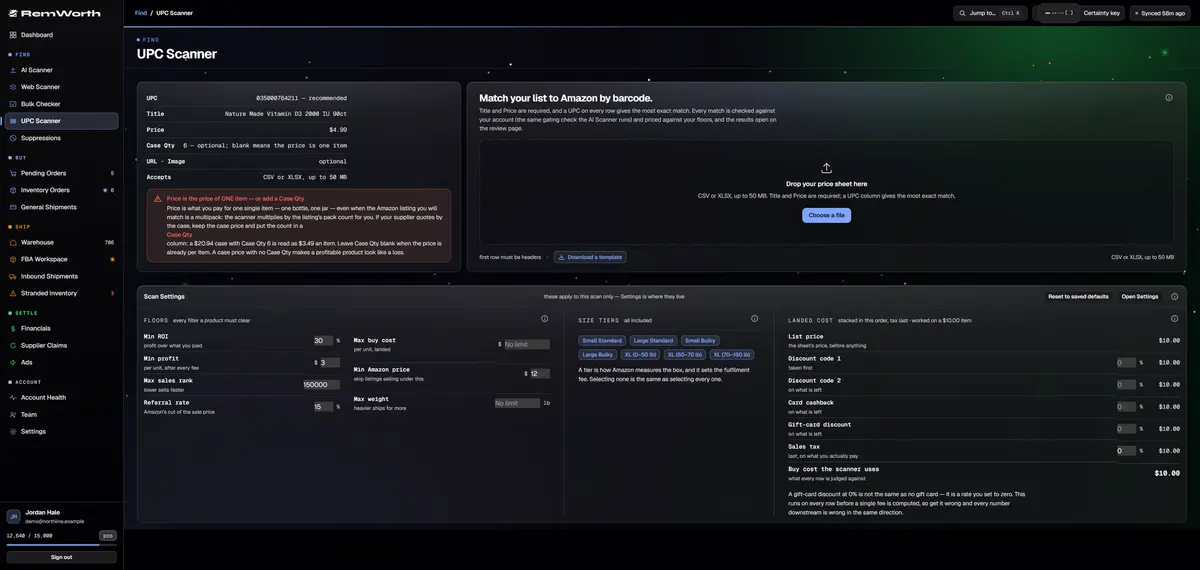
- Any day: price a barcode listTrial task: got a list with UPCs? Run it through the UPC Scanner, up to 5,000 rows a file. Each match comes back with price, rank, fees from Amazon's rate card and your profit per unit. Every match is also checked against your own account: Ungated, Can apply, Restricted.
- Buy it, then count it inFinalize the review and your buys land on Pending Orders. Record the order, then receive it, label it and ship it to FBA. All of that works in the trial.
- Day 8: the plan startsUnless you cancel, the plan price starts on day 8, and so do its monthly AI scan rows for the Web Scanner and the AI Scanner. Cancel before day 8 and you pay nothing.
Up close
What works in the trial, and what runs on paid rows.
Up to 500 ASINs, separated any way you like, or a .csv, .tsv or .txt file. Duplicates and anything that isn't an ASIN are dropped. It uses no AI scan rows.
Each check is saved to your account: reopen it, export it to CSV or Excel, and run the same list again later to compare.
The Web Scanner spends one AI scan row per product in your list. The trial has none; your plan's monthly rows start on day 8.
The Web Scanner
Reverse sourcing that checks every source.
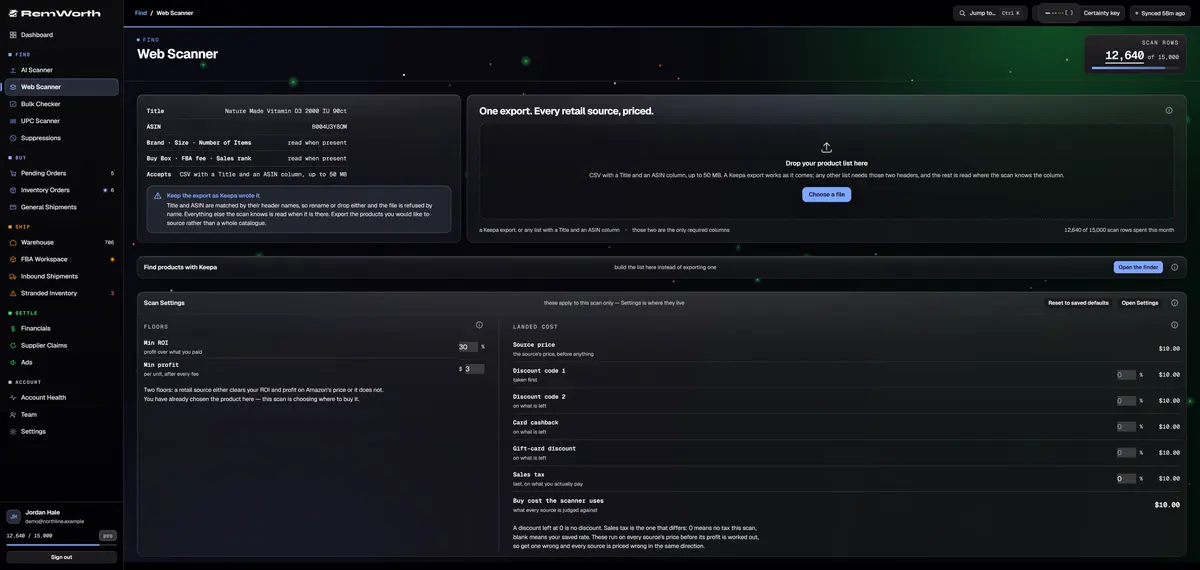
You know what sells on Amazon. The Web Scanner finds where to buy it, and checks each retail source before it prices it.
- Your list
- any CSV with a Title and an ASIN column, up to 50 MB
- Or build it here
- a built-in product finder makes the list inside the Web Scanner and sends it straight to a scan; plans include a daily finder allowance
- Sources
- major retailers searched for every product; set a ZIP in Settings to include stores near you
- Identity
- brand, variant, form, size, potency and count checked on every source, with a confidence tier and a side-by-side image compare with synchronized zoom
- Teaser prices
- implausibly cheap prices are caught and never priced
- Pack size
- the store's pack and the Amazon listing's pack are lined up, so your cost is per Amazon unit
- Amazon side
- Buy Box, referral fee, FBA fee from Amazon's rate card, rank and monthly sold, fetched fresh at scan time
- Gating
- each Amazon product on your list checked on your own account: Ungated, Can apply, Restricted
- Your cost
- two discount codes, card cashback, gift-card discount and sales tax, plus your minimum ROI and profit, set per scan
- Rejected sources
- "View all checked sources" lists every source that failed and why
- Hand-off
- finalize the review and your buys go to Pending Orders with the retailer as supplier; the scan exports to CSV or Excel
- Rows
- one AI scan row per product in your list
From lead to Amazon
An online arbitrage run in Remworth.
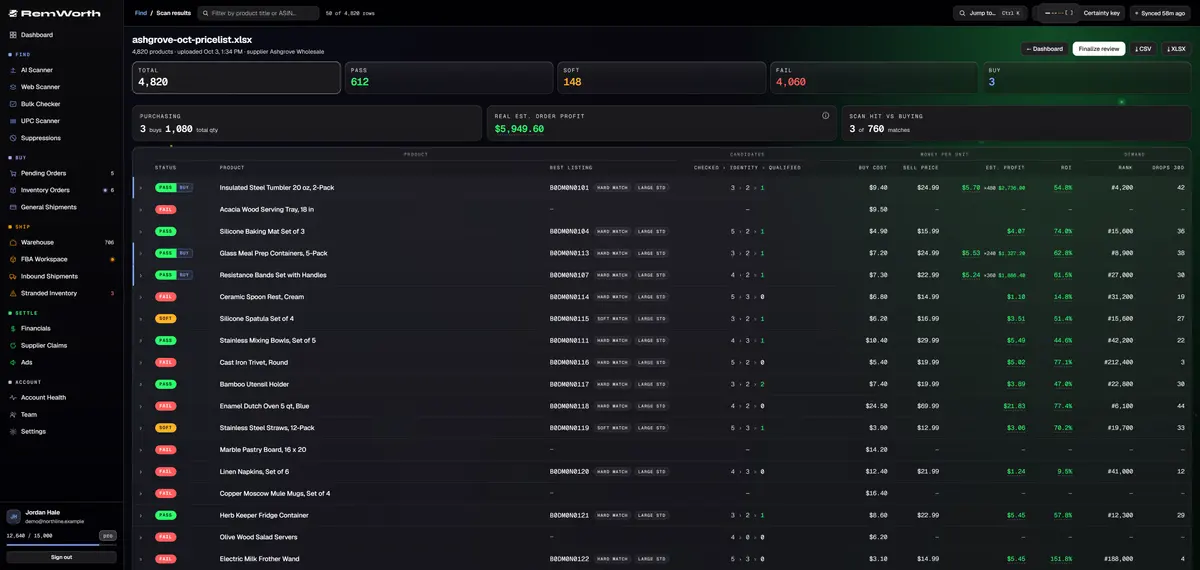
- Bring the list, or build itUpload Amazon products that sell to the Web Scanner, or build the list with its finder. Have a list of store products instead? The AI Scanner reads links, images, titles and prices; the UPC Scanner reads barcodes.
- Review and mark the buysCheck the identity marks and the images, then mark what you will buy. Finalize the review and the buys land on Pending Orders, grouped by supplier.
- Check gatingThe review shows what your account can sell before you spend: Ungated, Can apply, Restricted. Can apply comes with Amazon's approval link when Amazon gives one; you apply.
- Order and record itMark items ordered and the purchase order is created for you. Record the order number, the card you paid with and the cashback portal you went through.
- Receive itCount each item in as good, damaged, expired or cancelled. Each unit's cost is set the moment you receive it, order by order.
- Label and send to AmazonPrint 2x1-inch FNSKU labels from the browser, then run Amazon's send-to-Amazon flow in the app: plan, packing, carrier, delivery window and box labels.
Switching tools?
Already use one of these tools?
Each comparison says what the other tool does well, taken from its own website and checked October 2026.
| If you use | Remworth, in a line | Read |
|---|---|---|
| Tactical Arbitrage | Tactical Arbitrage scans 1,400+ retail sites for deals. Remworth starts from your own product list: for each row the AI Scanner finds the product on Amazon from its title, no UPC needed, keeps only the listings that match the product exactly on brand, variant, form, size, potency and count, up to five per row, with any doubt flagged, checks your gating and scores them by your rules, then carries the buys through receiving, labels and FBA. | Tactical Arbitrage vs Remworth |
| InventoryLab | InventoryLab takes what you've bought and lists, ships and books it, with Scoutify for checking items as you source. Remworth checks whole lists before you buy, lists and ships the same way, and keeps books you can prove: every Amazon deposit checked against them order by order, the difference shown per statement, and no sale booked at a cost it doesn't have. Your InventoryLab sales history imports. | InventoryLab vs Remworth |
| Seller Assistant | The buy, the stock, the FBA shipment and a profit-and-loss checked against Amazon's settlement statements, in one app. | Seller Assistant vs Remworth |
Straight answers
What Remworth doesn't do for OA.
- No retail-site crawler. It doesn't sweep store websites for deals. It works from what you bring: a distributor's price list or Excel file, matched to Amazon product by product, or a list of Amazon products it searches retailers for.
- No lead lists, and no deal or price-drop alerts.
- Lens works on amazon.com pages, not on store websites. It isn't on the Chrome Web Store yet, so for now it's installed by hand from Chrome's extensions page.
- Not an ungating service. You get Amazon's approval link and apply yourself.
- amazon.com only. For store shelves, Store Mode on your phone comes with Lens.
Next in the workflow
Questions
Online arbitrage questions
What is online arbitrage on Amazon?
Buying products from online stores, usually on sale or clearance, and reselling them on Amazon for more than they cost you after fees. The goods come to you, not straight to your customer. You then prep, label and send them to Amazon's warehouses (FBA), or ship orders yourself. Remworth covers checking and pricing the buys, and getting them from your door to Amazon.
What is Amazon to Amazon arbitrage?
Buying a product on Amazon while its price is low and reselling it on Amazon after the price recovers. Lens helps on the product page: price and rank history, your profit and ROI at the price you would pay, the most you can pay to hit your target, and whether your account can sell it. Some sellers use the phrase for buying on one Amazon marketplace and selling on another. Remworth is amazon.com only, so it doesn't cover that.
Can I buy from another store, or from Amazon, and have it shipped straight to my customer?
No. An Amazon staff post on the Seller Forums lists buying from another seller, including Amazon, and having them ship directly to customers as drop shipping that isn't allowed. In online arbitrage you receive the goods yourself, then sell them through FBA or ship them yourself.
How do I check if an online arbitrage find is restricted on my account?
Paste up to 500 ASINs into the Bulk Checker. Each comes back Ungated, Can apply (with Amazon's approval link), Restricted, or Couldn't check, from your own account, with Amazon's reason. Lens asks the same question the moment you open a product page. The Web Scanner, the AI Scanner and the UPC Scanner check at scan time: each product shows Ungated, Can apply, Restricted.
Do I have to label online arbitrage items for FBA?
Yes. Amazon ended commingling for inventory shipped on or after March 31, 2026: resellers must now use Amazon barcode stickers even on products that already carry a manufacturer barcode. The exception is brand owners with the Brand Representative selling role in Brand Registry. And since January 1, 2026, Amazon no longer offers prep and item labeling for US FBA shipments, so applying the labels is up to you. Remworth prints 2x1-inch FNSKU labels straight from the browser.
How do I count coupons, cashback and gift cards in my OA profit?
Set them on the scan. The Web Scanner and the AI Scanner take two discount codes, card cashback, a gift-card discount and sales tax for each scan, along with your minimum ROI and profit. Profit is shown per unit, on your cost with all of them applied and after Amazon's fees. When you order, record the card you paid with and the cashback portal you went through.
Does Remworth have OA lead lists, a retail site scanner or deal alerts?
No. Remworth doesn't sell lead lists, doesn't crawl retail websites, and doesn't send deal or price-drop alerts. It checks the leads you bring: a list of Amazon products to reverse-source, a list of store products, or the Amazon page you have open in Lens. The Web Scanner's built-in finder can build that list of Amazon products from filters you set.
Can I try it before I pay?
Yes. The trial is free for 7 days and needs a card. The UPC Scanner and the Bulk Checker work in the trial. The Web Scanner and the AI Scanner use AI scan rows, which come with a paid plan.
Start with the leads you already have.
Start the 7-day trial, connect your Amazon account and paste up to 500 ASINs into the Bulk Checker: each one comes back with a verdict from your own account. Then run a barcode list through the UPC Scanner. Neither uses AI scan rows; the Web Scanner runs on paid AI scan rows, and your plan's monthly rows start on day 8.
Solo $199.99/mo · Pro $349.99/mo · 7 days free, card required
On your phone? Start with just your email. The link we email you works once, on any device, within 7 days, and the app opens once you've picked a plan, added your card and connected your Amazon seller account.
Your Amazon password stays with Amazon. How Remworth connects.
Sources
- Amazon staff post on drop shipping (Seller Forums, Bryce_Amazon) not allowed: purchasing products from another seller, including Amazon, and having them ship directly to customers
- News_Amazon: Commingling practices will end effective March 31, 2026 (Seller Forums) for inventory shipped on or after March 31, 2026, resellers must use Amazon barcode stickers even on products with a manufacturer barcode; Brand Representatives in Brand Registry are the exception
- Amazon SP-API changelog: US FBA prep and labeling services to end January 1, 2026 from January 1, 2026, prep and item labeling services for FBA shipments are no longer available in the US marketplace