Amazon FBA inventory management softwareFrom "buy it" to Amazon's dock,
nothing gets re-typed.
Amazon FBA inventory management starts before Amazon ever sees a unit. Remworth runs that part: what you ordered from each supplier, what arrived good or damaged, which bin it sits in, and what you paid for it. Sales are then costed first in, first out, at the price you actually paid.
Solo $199.99/mo · Pro $349.99/mo · 7 days free, card required
- Buybuy list to purchase order, nothing re-typed
- Costlocked at receive, per supplier order
- Shelfzone, shelf and bin, with FNSKU labels
- Marketplaceamazon.com only
Buy and shelf
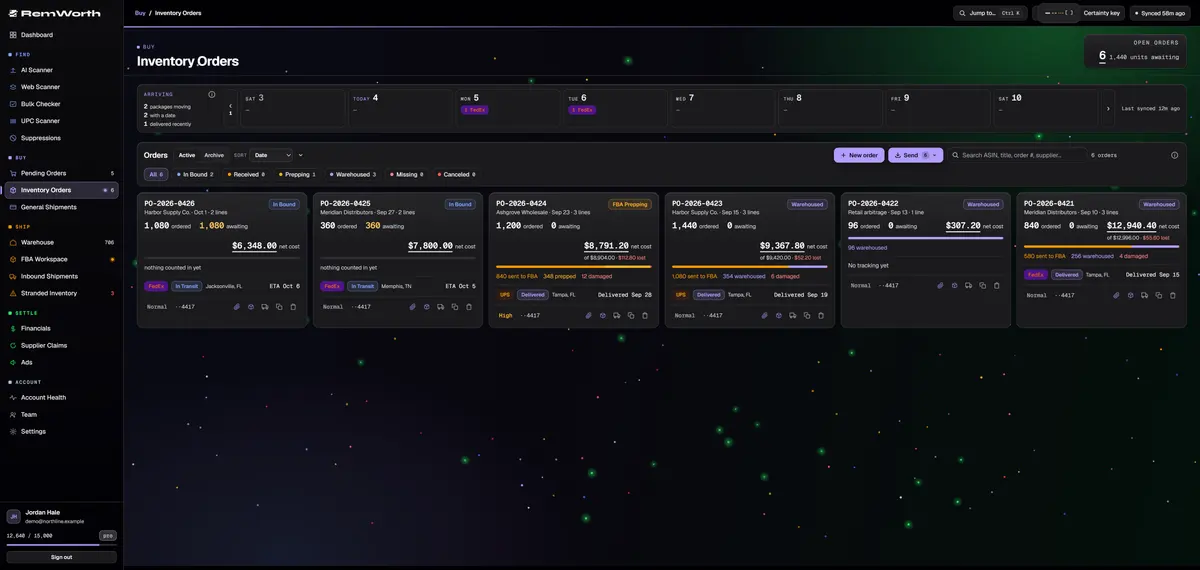
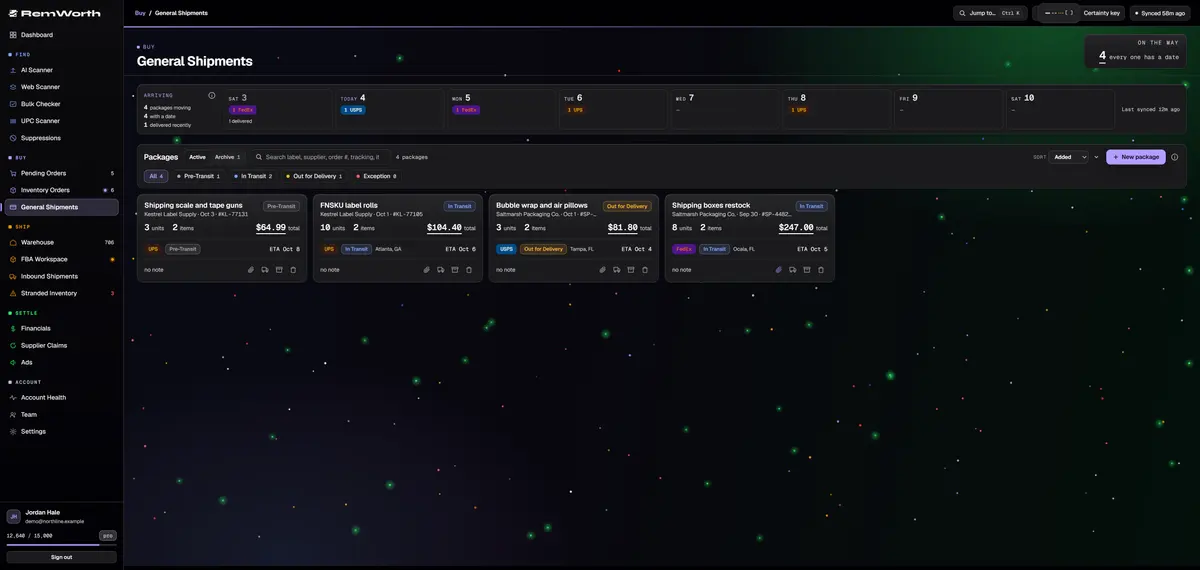
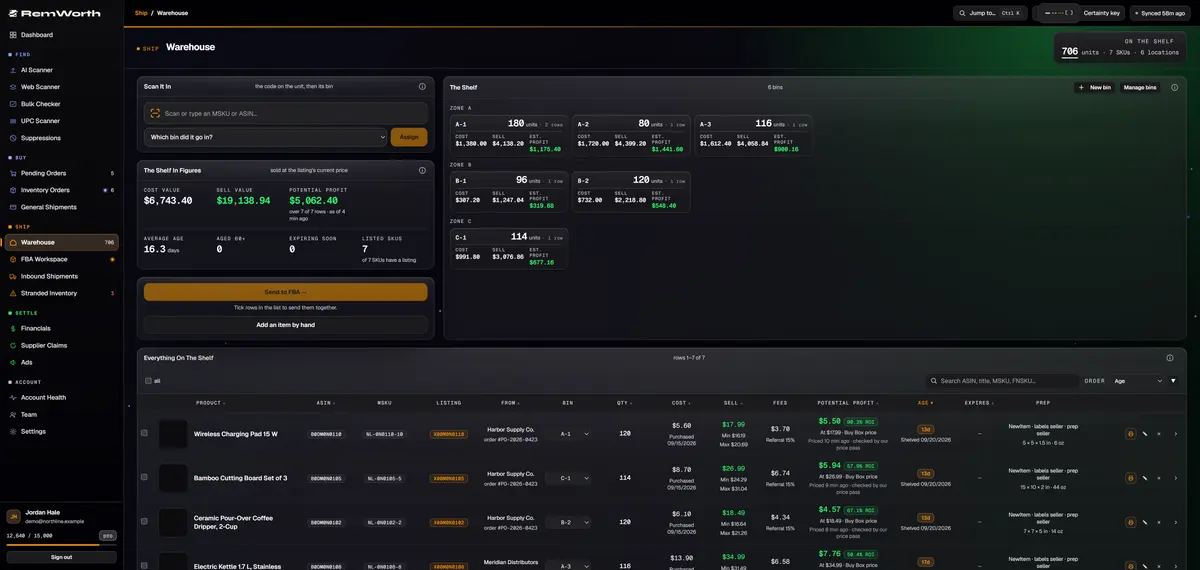
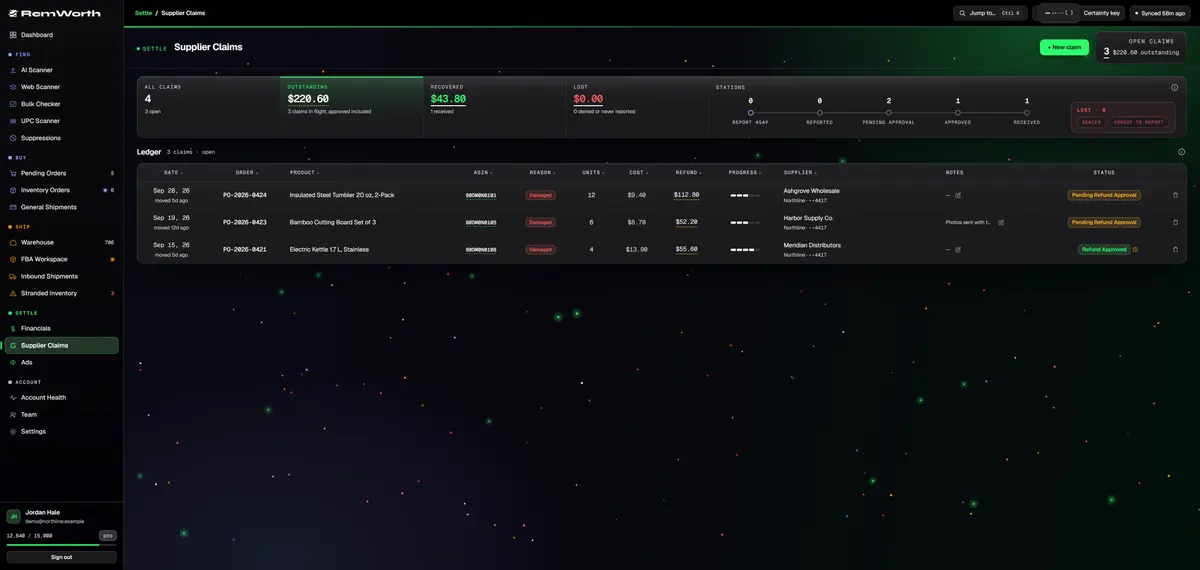
Five screens between your supplier and Amazon.

The basics
Amazon FBA inventory management has two halves.
Amazon describes inventory management as tracking the products in your store or warehouse so you can meet customer demand. For an FBA reseller, that tracking happens in two places.
Inside Amazon's network, Seller Central has its own tools: low-stock alerts, demand planning that suggests inventory levels and shipment timelines, a restock tool, an inventory age report, and the Inventory Performance Index (IPI), which Amazon calls a measure of how efficiently you manage FBA inventory.
Before Amazon, the work is yours: ordering from suppliers, checking what arrived, chasing refunds for what came damaged, storing and labeling units, and remembering what each batch cost. Since March 31, 2026, Amazon requires resellers to use Amazon barcode stickers even when a product has a manufacturer barcode, so labeling is part of that work too.
Remworth is the inventory management system for that second half. It also reads Amazon's counts back in, so you see both halves side by side.
How it flows
From a buy to a costed unit on your shelf.
- BuyFinalize a scan review and every item you marked buy lands on Pending Orders, grouped by supplier, with its ASIN, source link, cost and target prices. Manual and trade-show buys go on the same list.
- OrderTick the lines you are buying, then enter the supplier's order number, the card and the cashback portal once. Confirm, and a purchase order opens or extends itself.
- TrackPaste a tracking number and the carrier is detected from the number alone. Live status comes from UPS, FedEx, USPS, OnTrac and CDL Last Mile, and an 8-day calendar counts the packages due each day.
- ReceiveCount each item good, damaged, expired or cancelled; case mode multiplies for you. The cost is locked per supplier order the moment you receive. Scan a QR code and your phone takes the photos, no app needed.
- ClaimDamaged or expired units open a refund case with your supplier, priced at what you paid and marked Report ASAP. You make the contact; Remworth tracks the case through to Refund Received.
- Shelve and labelScan an MSKU or ASIN, pick a bin, assign. Print 2 x 1 inch FNSKU labels from the browser, then tick rows and send them to FBA when you are ready.
Your records next to Amazon's
Know what you own, wherever it sits.
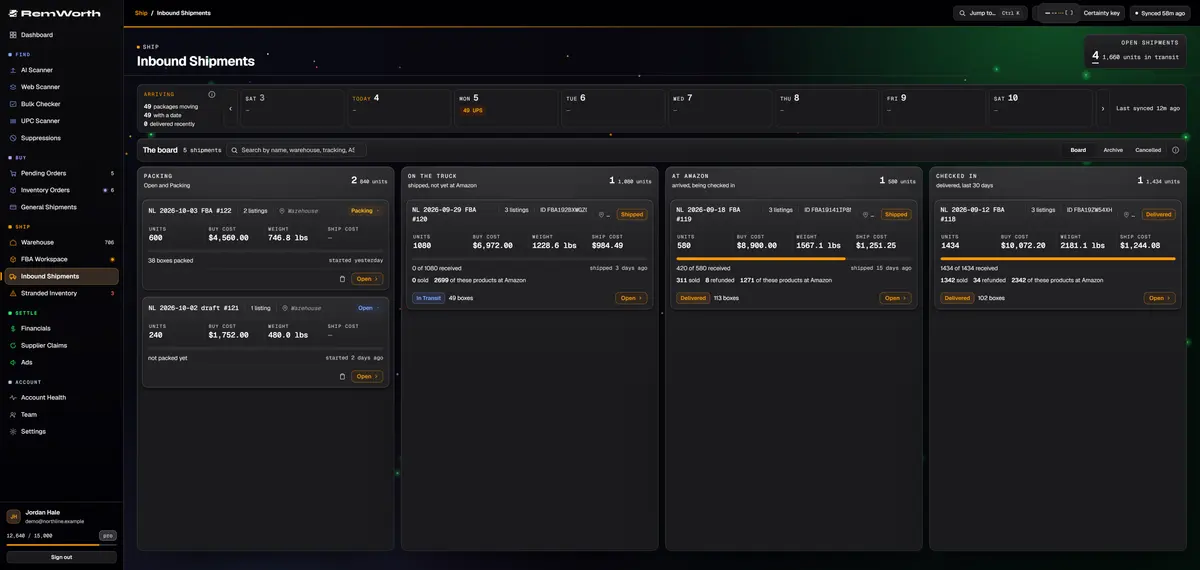
Remworth reads Amazon's inventory feed and puts it beside your own records.
- On hand
- one number per product, split across Amazon, your warehouse, units in prep and staged boxes
- Amazon's counts
- fulfillable, reserved, inbound and unsellable, from Amazon's feed
- Gaps
- products where Amazon shows fewer units than your records are flagged, never silently zeroed
- Check-in
- what you shipped against what Amazon received, per product, per shipment
- Age
- Amazon's age buckets per SKU, aged-inventory surcharge estimates, sell-through and days of supply
- Your shelf
- cost value, sell value, estimated profit, average shelf age, and what expires within 30 days
- Cost
- each supplier order keeps its own cost layer, so two buys of one product at two prices never blur together
- Stranded
- Amazon's stranded report checked around the clock, with Amazon's reason and a countdown to its auto-removal deadline
Spreadsheet or Remworth
Still running inventory from a spreadsheet?
A spreadsheet holds what you type into it. It can't follow a tracking number or read Amazon's counts.
Coming from InventoryLab rather than a spreadsheet? See what each one does well, and how your sales history comes with you.
Questions
Inventory questions sellers ask.
How do I manage my Amazon FBA inventory?
In two halves. Inside Amazon, use Seller Central's own tools: low-stock alerts, restock suggestions, the inventory age report and your IPI score. Before Amazon, keep a record of what you ordered, what arrived, where it sits and what it cost, and check it against Amazon's counts. Remworth keeps that second half and puts Amazon's fulfillable, reserved, inbound and unsellable counts beside it.
Is there free Amazon inventory software?
Yes. For selling across several channels, Amazon points to Veeqo, which it calls free Amazon inventory management software. Seller Central also has inventory tools built in for FBA sellers.
Remworth is paid: $199.99 a month on Solo or $349.99 on Pro. Its inventory side covers the half before Amazon: supplier orders, receiving, bins and what each batch cost. The 7-day trial is free: a card is required, nothing is charged during the trial, and purchase orders, receiving, the warehouse, supplier claims and Amazon's counts all work in it. The plan price starts on day 8 unless you cancel, and payments are not refunded.
How do I keep track of inventory and purchases for online arbitrage?
Track each buy at the order level: the supplier, the order number, the card you paid with, the cashback portal, the cost per unit and the pack size. Then record what actually arrived (good, damaged or expired) and keep each batch's cost separate. In Remworth, your buys land on Pending Orders when you finalize a scan review, become a purchase order when you confirm them, and get their cost locked per order when you receive.
What is FIFO inventory management? Does Remworth use FIFO or LIFO?
IRS Publication 538 describes FIFO (first in, first out) as assuming the items you bought first are the first ones you sold; LIFO (last in, first out) assumes the ones you bought last sold first. Remworth costs sales FIFO: each received batch keeps the price you paid, and sales draw from the oldest batch first. There is no LIFO setting. Which method you use for taxes is a question for your accountant; to change your inventory accounting method, the IRS says you must file Form 3115.
What happens if Amazon checks in fewer units than I shipped?
Compare what you shipped with what Amazon received, product by product, once Amazon finishes receiving, then follow up any shortfall with Amazon. Remworth pulls Amazon's check-in counts automatically and shows shipped against received for each product on each shipment. On the shipment, Print reimbursement claim gathers the evidence: what shipped, what it cost, what Amazon received, and the supplier invoices on file for those orders. You file the case.
Can I bring my spreadsheet or InventoryLab history into Remworth?
Partly. Stock you hold with no order behind it, like returns or a liquidation lot, goes into the warehouse by ASIN with its cost. For stock bought before you joined, the account owner can open the importer in Settings and download a cost-history template: a CSV pre-filled with your Amazon catalog. Add what you paid per unit and upload it, and sales with no cost on record take that cost.
From InventoryLab, the account owner can import its FBA Sales export directly. Before anything is written, you see how the import compares with InventoryLab's own profit figures, and orders already in Remworth are skipped. See InventoryLab and Remworth compared.
Can my prep staff receive orders without seeing my profit?
Yes. An account holds up to 5 people, the owner included. Give prep staff the Prepper role: receiving and shipments, never the P&L. Every receive records who did it, and the owner can undo a team member's receive.
Straight answers
What Remworth inventory doesn't do.
- No demand forecasting or reorder points. The nearest thing is a scan setting, Restock, that keeps only products you already sell that will run out within the days you set, so a supplier's list becomes a reorder list. For demand planning, Seller Central has its own restock tools.
- No multichannel sync. It doesn't list or sync stock on eBay or any other marketplace, and it works with amazon.com only.
- Not a prep service. It prints labels and tracks the work; your team or your prep center does the physical prep.
- It doesn't contact suppliers or file Amazon claims for you. It tracks supplier cases and prints the evidence for an Amazon reimbursement claim; you send them.
Go deeper
Sources
Where the Amazon and IRS facts come from.
- Amazon: Inventory management techniques and best practices: what inventory management is; the inventory tools in Seller Central (low-stock alerts, demand planning, the restock tool, the inventory age report and IPI); Veeqo, which Amazon calls free inventory management software for selling across channels.
- Amazon announcement (News_Amazon): Commingling practices will end effective March 31, 2026: resellers must use Amazon barcode stickers even when a product has a manufacturer barcode.
- IRS Publication 538, Accounting Periods and Methods: the FIFO and LIFO definitions; Form 3115 to change an inventory accounting method.
Read on October 4, 2026. Amazon changes its tools and rules, so check the source before you rely on a detail.
Receive your next order in it.
Start the 7-day trial, connect your Amazon account, and the cost layers start with the first delivery you count.
Solo $199.99/mo · Pro $349.99/mo · 7 days free, card required
On your phone? Start with just your email. The link we email you works once, on any device, within 7 days, and the app opens once you've picked a plan, added your card and connected your Amazon seller account.
Your Amazon password stays with Amazon. How Remworth connects.