Supplier refund trackerCount it damaged.
The claim opens itself.
Supplier Claims is the supplier refund tracker that starts at receiving. Count units as damaged or expired when an order comes in, and a claim opens on its own, priced at what you paid on that order and marked Report ASAP. You contact the distributor or online store you bought from. Remworth keeps the claim, the card the refund should land on, and the reminder to check that it did.
- Opensby itself, for damaged or expired units at receiving
- Pricedat what you paid on that order
- StationsReport ASAP to Received, plus Denied and Forgot to report
- Reminderon the dashboard when an approved refund waits too long
A claim, start to finish
From the damaged case to the refund on your statement.
Count units as damaged or expired when you receive an order and a claim opens by itself: the order, the product, the ASIN and the units, marked Report ASAP.
The claim is sized at units times the cost on that order. Count more damaged units on a later delivery, or undo a receive, and the claim follows.
Claims opened from an order carry the supplier, the account you bought on and the card's last four digits. Full card numbers are never stored.
Click the status to move the claim: Reported, Pending approval, Approved, Received. Dated notes keep what the supplier said on the claim itself.
The strip counts the claims at each station. Click one to see only those. Denied and Forgot to report fall off to Lost, so a write-off stays on the record.
Dollar figures for money outstanding, recovered and lost. An approved refund counts as outstanding until you mark it Received, because approved is not paid.
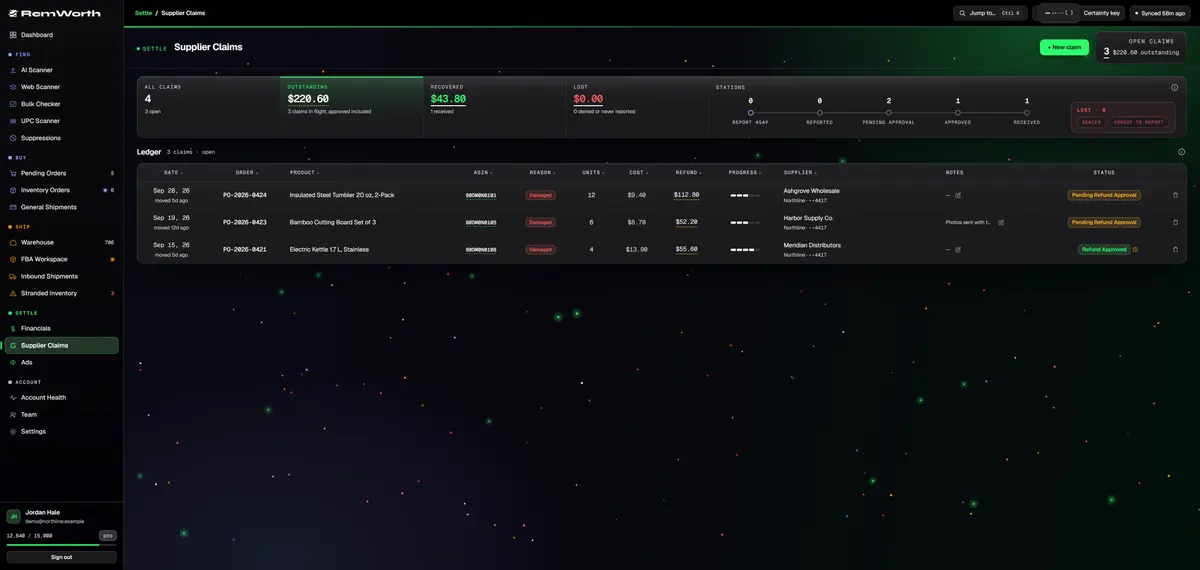
A damaged wholesale order
What to do when a supplier order arrives damaged.
The same five steps work for a distributor case or an online arbitrage order. Remworth fills in the claim as you go.
- Count it in the day it arrivesOpen the order and count each line as good, damaged, expired or cancelled. Check your supplier's terms for how fast they want damage reported.
- Photograph the damageScan the QR code on your desktop and shoot it on your phone, no app and no login: up to six sides and 12 photos per product, filed to the order item and bundled into one PDF per item.
- Report it to the supplierSend the email or open the ticket. The claim already holds the order number, the units and what you paid. Move it to Reported.
- Log what they sayAdd a dated note each time they reply, and move the claim to Pending approval, then Approved.
- Check the statementApproved is not paid. The claim shows which card to check, and the dashboard reminds you if it sits at Approved too long. Mark it Received when the credit posts, or Denied if they refuse.
What every claim carries
The paperwork, already filled in.
- Opens itself
- damaged or expired units counted at receiving open a claim at Report ASAP
- Priced at
- units times what you paid on that order
- Follows the count
- more damaged units on a later delivery, or an undone receive, update the same claim
- Manual claims
- ASIN, product, order number, supplier, reason (damaged, expired or missing), units, unit cost and a note
- Card and account
- claims opened from an order show the buying account and the card's last four digits
- Stations
- Report ASAP, Reported, Pending approval, Approved, Received; Denied and Forgot to report for honest write-offs
- Money
- dollar figures for money outstanding, recovered and lost
- On the order
- a status dot beside the order's damaged and expired counts shows where each claim stands
- On the dashboard
- an Owed back tile with what suppliers still owe you
- Reminder
- when a refund sits at Approved past your set days: 14 by default, or a number you choose
- Team
- the Bookkeeper and Manager presets include claims, or tick the page for any teammate
Not the same money
A supplier claim is not an Amazon reimbursement.
Both are money owed back to you. They come from different places, and Remworth keeps them apart.
Straight answers
What it doesn't do.
- It doesn't contact your supplier. You send the email or open the ticket; Remworth keeps the claim, the notes and the reminder.
- Units that never arrived don't open a claim on their own. Receiving counts good, damaged, expired and cancelled units, so record a short shipment by hand with the reason Missing.
- It doesn't read your card statement. It shows which card to check and reminds you when an approved refund has waited too long.
- It isn't an Amazon reimbursement service, and it doesn't file claims with Amazon for you.
Around the claim
Questions
Supplier refund questions
What should I do when a wholesale order arrives damaged?
Count it in right away, note how many units are damaged, photograph them, and report it to the supplier with the order number. Check your supplier's terms for how fast they want damage reported. In Remworth, marking units damaged when you receive the order opens the claim for you at Report ASAP, priced at what you paid, and Receiving Photos files the pictures to the order item.
Is a supplier refund the same as an Amazon reimbursement?
No. A supplier refund comes from the distributor or online store you bought from, for units that reached you damaged, expired or short. An Amazon reimbursement comes from Amazon under its FBA reimbursement policy, which covers FBA inventory "lost or damaged before a customer order," in Amazon's words, and inventory lost or damaged after one. Remworth tracks them apart: supplier claims here, Amazon reimbursements in the reimbursement ledger.
Does Remworth contact my supplier for me?
No. You send the email or open the ticket. Remworth keeps the record: the claim, its status, dated notes of what the supplier said, and a reminder to check your card once a refund is approved.
Can I file a claim for units my supplier never sent?
Yes, by hand. Receiving counts units as good, damaged, expired or cancelled, so only damaged and expired units open a claim on their own. For a short shipment, click + New claim and pick the reason Missing. Enter the units and the unit cost, and the claim is sized for you.
My supplier approved the refund. Why is it still outstanding?
Because approved is not paid. A claim at Approved counts as outstanding until you mark it Received. A claim opened from an order shows the account and the last four digits of the card you bought on, so you know which statement to check. If it sits at Approved past your set days (14 by default), the dashboard reminds you.
What does "Forgot to report" mean?
It is the honest way to close a claim you never raised with the supplier. Together with Denied, it counts as Lost, so the money you didn't get back stays on the record instead of quietly disappearing.
How do I track purchases and supplier refunds for online arbitrage?
Keep each buy at the order level: the store, order number, card, cashback portal and cost per unit. Then record what actually arrived. Remworth keeps every purchase order with its supplier, card and cashback portal, counts what arrived against it, and opens supplier claims for the damaged and expired units.
Why check units before they go to Amazon?
Your door is where you see what the supplier actually sent. Amazon no longer offers prep or item labeling for US FBA shipments created from January 1, 2026, and an Amazon staff reply says shipments that arrive without proper prep and item labeling "won't be eligible for reimbursement if damaged or untraceable." Counting each order in is where damaged and expired units get caught and claimed from the supplier.
Put every supplier claim on one ledger.
Start the 7-day trial, receive your next order in Remworth, and the damaged and expired units open their own claims.
Solo $199.99/mo · Pro $349.99/mo · 7 days free, card required
On your phone? Start with just your email. The link we email you works once, on any device, within 7 days, and the app opens once you've picked a plan, added your card and connected your Amazon seller account.
Your Amazon password stays with Amazon. How Remworth connects.
Sources
- Update to the FBA inventory reimbursement policy (News_Amazon, Seller Forums) FBA inventory "lost or damaged before a customer order"
- Amazon staff reply (Jameson_Amazon), Seller Forums no prep or item labeling for US FBA shipments created from January 1, 2026; unprepped or unlabeled units "won't be eligible for reimbursement if damaged or untraceable"