Amazon hazmat and restricted products checkKnow what your account can sell
before you buy the case.
Gated brands and restricted categories decide what your account can sell, and Amazon hazmat rules govern what you can send to FBA. Paste up to 500 ASINs into the Bulk Checker and get the answer for your seller account: Ungated, Can apply (with the link to Amazon's application), Restricted, or Couldn't check. The AI Scanner and the UPC Scanner flag dangerous goods in their results.
- Per checkup to 500 ASINs
- VerdictsUngated, Can apply, Restricted, Couldn't check
- Checked onyour own connected seller account
- Includedevery plan; uses no AI scan rows
A check, start to finish
From a pile of ASINs to a list you can actually buy from.
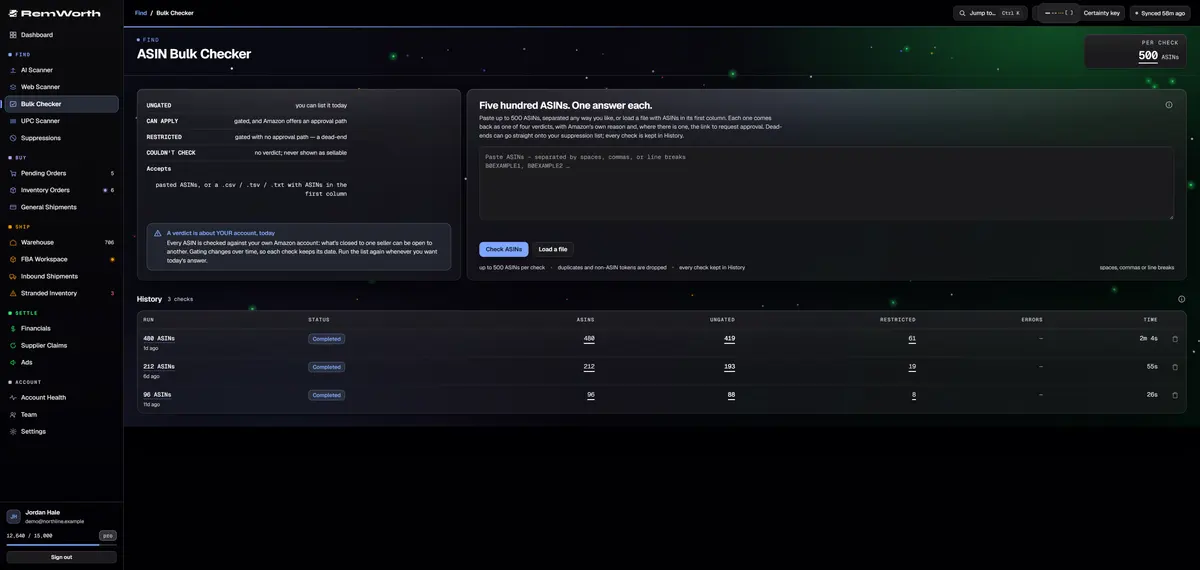
Up to 500 ASINs, separated by spaces, commas or line breaks, or a .csv, .tsv or .txt file with ASINs in the first column. Duplicates are collapsed, and anything that isn't an ASIN is dropped and counted.
Ungated: you can list it today. Can apply: gated, and Amazon offers an approval path, with the link. Restricted: a dead end. Couldn't check: no verdict, and never shown as sellable.
Each ASIN is checked on your own connected seller account, so the answer is yours, not another seller's. Gated rows show Amazon's own reason, and the export adds Amazon's reason codes.
Checks are kept in History. Reopen one, export it as CSV or a color-coded Excel file with Amazon's reasons and approval links, or run the same list again next quarter and compare.
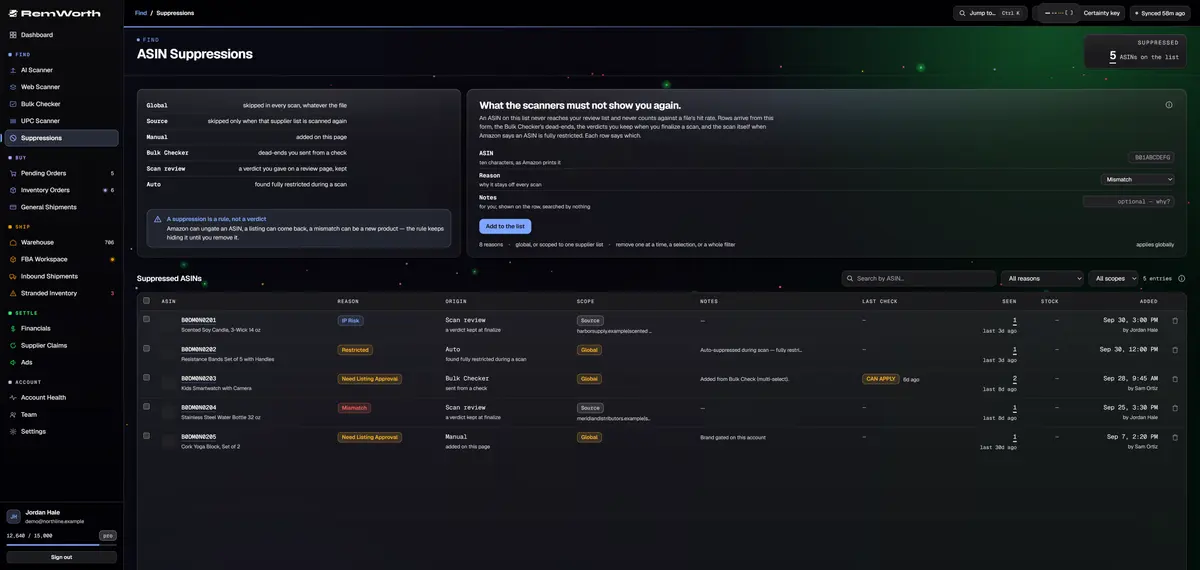
One click sends a check's dead ends to your suppression list, next to the products you ruled out in review and the ones a scan found fully restricted. Each entry says where it came from.
Add any ASIN by hand with a reason and a note, and every AI scan in your account skips it. Changed your mind? Remove one entry, a selection, or everything a filter finds.
What every check gives you
Amazon's answer for each ASIN, in a form you can work with.
Amazon's guides show the manual check: search each product under Add products in Seller Central. The Bulk Checker takes up to 500 ASINs per check and keeps every answer.
- Verdicts
- Ungated, Can apply, Restricted, or Couldn't check
- Reasons
- Amazon's own reason on the page; Amazon's reason codes and messages in the export
- Can apply
- one click to the exact Seller Central application
- Condition
- checked for selling new
- Progress
- live while it runs; cancel and keep every verdict already done; leave the page and it keeps going
- Filters
- Ungated, Can apply, Dead-ends and Couldn't check, with counts; every ASIN linked to its Amazon page
- History
- every check saved; the account owner sees the whole team's checks
- Export
- CSV or color-coded Excel with reason codes, messages, approval links, Amazon URLs and the time checked
- Clean-up
- send every dead end, or the gated rows you pick, to your suppression list
- Cost
- included in every plan; uses no AI scan rows
Amazon ungating
Check if your account can sell it before you buy.
Ungating means getting Amazon's approval to list something that needs it: a single ASIN, a brand, a brand within a category, a category or a sub-category (Amazon's approvals page). The answer depends on your account, so check yours first and apply only where Amazon offers a path. The application is yours: Remworth never applies for you.
- Check before you buyPaste the supplier's ASINs into the Bulk Checker, up to 500 at a time. Ungated items are ready to list, Restricted ones are dead ends, and the Can apply items are your ungating list.
- Open Amazon's applicationCan apply links straight to the Seller Central application. In Seller Central itself, search the product under Catalog, then Add products: Amazon shows Apply to sell when you need approval (Amazon's grocery guide).
- Gather what Amazon asks forFor brand approval, Amazon asks for a purchase invoice from a manufacturer or distributor, or a brand authorization letter (Amazon's branded products guide). Its beauty and grocery guides mention invoices showing 10 or more units. Read what your application asks for; it differs by category.
- Wait for Amazon's reviewAmazon says you'll usually get confirmation within 24 hours that your brand application is being reviewed, and the review is usually done within three business days.
- Check againRun the list again once you hear back. Every bulk check and every new AI, UPC or Web scan asks Amazon fresh, so an approval shows up the next time you look.
Amazon hazmat
Dangerous goods, flagged before you buy.
Amazon uses "hazmat" to mean dangerous goods (Amazon's glossary). Its seller guides name hairspray, perfume, nail polish, alcohol-based hand sanitizer and spray sunscreen among them. They say you need to enroll in the FBA Dangerous Goods program to send dangerous goods to FBA, and that a dangerous good needs a safety data sheet for hazmat approval (beauty guide, health and personal care guide). The AI Scanner and the UPC Scanner flag dangerous goods in their results, from Amazon's own classification.
- Hazmat: can't send
- Amazon classifies it as a dangerous good that can't be sent to FBA
- Hazmat: can send
- a dangerous good you can send to FBA, with restrictions
- Battery
- it ships a lithium battery, which is not the same as "batteries not included"
- Haz review
- Amazon is reviewing the listing's dangerous-goods classification
- Meltable
- heat-sensitive (AI Scanner results)
- Rule it out
- mark it Haz in review and finalizing puts it on your suppression list
- Where
- AI Scanner and UPC Scanner results; the Bulk Checker answers gating only
Straight answers
What it doesn't do.
- It doesn't apply for ungating, write your application or prepare your invoices. The click on Amazon's application is yours.
- It doesn't publish gated-brand or "auto-ungate" lists. It checks the ASINs you bring, on your own account.
- The Bulk Checker answers gating, not hazmat. Dangerous-goods flags come with AI Scanner and UPC Scanner results, and Remworth doesn't submit safety data sheets or handle Amazon's dangerous-goods reviews.
- It checks for selling new, not used or collectible.
- It needs your Amazon seller account connected. Without it, a check can't run.
- Suppressed ASINs are skipped by the AI Scanner. UPC Scanner and Web Scanner results still show them.
Next in the workflow
Questions
Restriction, ungating and hazmat questions
How do I check if a product is restricted on Amazon?
In Seller Central, go to Catalog, then Add products, and search for the product. Amazon says a Sell this product button means you're already approved, and Apply to sell means you need approval (Amazon's beauty guide). That search answers one product at a time. The Bulk Checker checks up to 500 ASINs on your own account at once and returns Ungated, Can apply, Restricted or Couldn't check, with Amazon's reason.
How do I know if a product is hazmat on Amazon before I buy it?
Amazon uses "hazmat" to mean dangerous goods: its seller guides list items like hairspray, perfume, nail polish and alcohol-based hand sanitizer. To send them to FBA, Amazon says you need to enroll in its FBA Dangerous Goods program, and a dangerous good needs a safety data sheet for hazmat approval. In Remworth, the AI Scanner and the UPC Scanner flag dangerous goods in their results: can't go to FBA, sendable with restrictions, lithium battery, or under Amazon's review. The Bulk Checker answers gating only.
How do I get ungated on Amazon?
You apply to Amazon, through the Apply to sell button in Seller Central or the Can apply link in the Bulk Checker. For brand approval Amazon asks for a purchase invoice from a manufacturer or distributor, or a brand authorization letter, and its beauty and grocery guides mention invoices showing 10 or more units. Remworth doesn't apply for you or prepare documents.
How long does Amazon brand approval take?
Amazon's guide to selling branded products says you'll usually get confirmation within 24 hours that your application is being reviewed, and the review is usually done within three business days. Run the ASINs through the Bulk Checker again afterward to see the new verdict.
Why is my product restricted on Amazon?
Amazon says some categories need its approval, some products can't be listed for legal, regulatory or policy reasons, and for a branded product your ability to sell can depend on your relationship with the brand (Amazon's seller FAQ). The answer is for your seller account, not for everyone. The Bulk Checker shows Amazon's own reason for every gated ASIN and splits Can apply (Amazon offers an approval path) from Restricted (no path), so you know which ones are worth an application.
Is there a list of ungated products or gated brands on Amazon?
Remworth doesn't publish one, and a list built from other sellers' accounts can't tell you your own status, because approval is per account. The reliable test is your own account: bring the ASINs you're thinking of buying and check them, up to 500 at a time.
Does the Bulk Checker cost extra or use AI scan rows?
No. Bulk checks are included in every plan and use no AI scan rows, and they work in the 7-day trial (card required). Your Amazon seller account needs to be connected, because the answer comes from your own account.
Will Remworth get me ungated?
No. It checks your real status and puts Amazon's application one click away. Remworth doesn't submit applications, write them, or sell an ungating service.
Check the list before you buy the case.
Start the 7-day trial, connect your Amazon account, and run your first list of up to 500 ASINs. Bulk checks are included in every plan.
Solo $199.99/mo · Pro $349.99/mo · 7 days free, card required
On your phone? Start with just your email. The link we email you works once, on any device, within 7 days, and the app opens once you've picked a plan, added your card and connected your Amazon seller account.
Your Amazon password stays with Amazon. How Remworth connects.