Retail arbitrage on AmazonBought in the store.
Booked, shipped and costed here.
Retail arbitrage is buying products in retail stores at lower prices and reselling them on Amazon for a profit. In the aisle, Store Mode, part of Lens, scans a barcode with your phone and shows up to five matching Amazon listings, priced at the shelf price you enter and checked on your own seller account. The rest of Remworth starts at the checkout: record the buy and its receipt, count it in, shelve and label it, ship it to FBA, and see what each sale really made.
Solo $199.99/mo · Pro $349.99/mo · 7 days free, card required
- In the aisleStore Mode on your phone, with Lens
- Each buystore, date, card, cost and receipt
- Labels2×1-inch FNSKU labels from the browser
- Marketplaceamazon.com only
After the store
From the shopping bags to Amazon's dock.
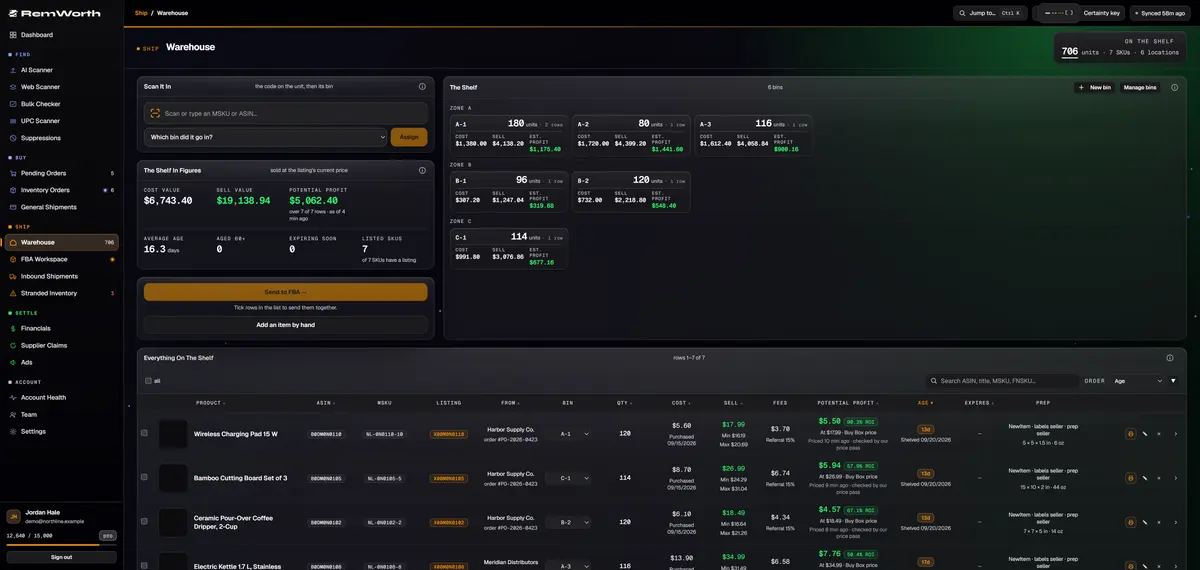
Counted-in units land here when you send them to the warehouse. Each row keeps the store you bought from, the order number, the purchase date and what you paid. A side buy with no order can be added by hand.
Scan or type the MSKU or ASIN with a standard barcode scanner, pick the bin, press Assign. Make as many zones, shelves and bins as your space has.
Every row shows estimated profit per unit at the listing's current price, after Amazon's fees and the freight, prep and storage costs in your settings, with the ROI under it. No buy cost, no figure: you see a dash, never $0.
Tick rows to print their labels or send them to FBA together. Loose units from separate buys pool into complete packs for multipack listings.
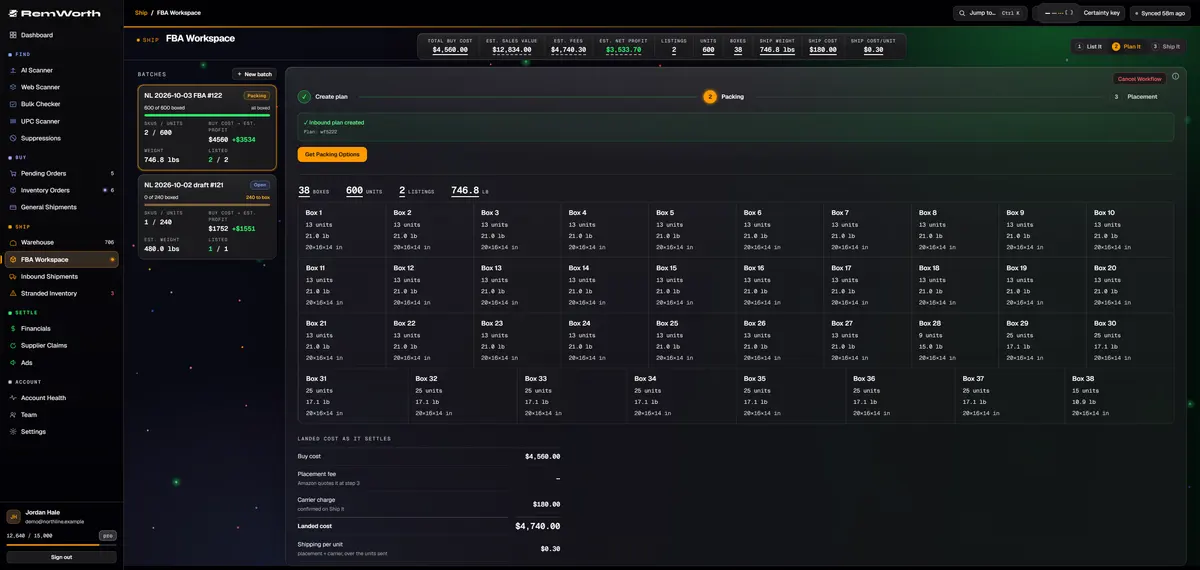
Each batch walks Amazon's send-to-Amazon flow in the app: the plan, packing and placement, then carrier, delivery window and box labels. Every box shows its units, weight and size.
Your buy cost, Amazon's placement fee and the carrier charge add up to the batch's landed cost. Each charge counts once it is confirmed, and the shipping cost per unit sits under the total.
Your first week
Your first week: one real store run.
The 7-day trial runs on your real Amazon account, and nothing below uses AI scan rows. The trip is yours; from the checkout on, here is the week. Start the 7-day trial
- Day 1: connect, then check your listConnect your amazon.com seller account through Amazon's own consent flow. Trial task: paste the ASINs you hunt for into the Bulk Checker, up to 500 at a time, each one Ungated, Can apply or Restricted on your own account.
- Your next store run: log the buyTrial task: open a new order: the store as the supplier, the receipt number as the order number, the date, the card, and one line per product with its ASIN, quantity, cost and pack size. Then attach the receipt as a PDF.
- Count it inReceive the order item by item: good, damaged or expired. Log a damaged unit and a refund case opens at what you paid, so the refund doesn't slip.
- Photograph and date itScan a QR code on your desktop and your phone takes the product photos, with no app and no login. Expiration dates are read off the label.
- Shelve, label, shipSend it to your warehouse shelf or straight into an FBA shipment. Print the FNSKU labels, box it, and run Amazon's send-to-Amazon steps in the app.
- Before day 8: check the booksThis month's orders fill in from the moment you connect, so you can hold Remworth's numbers up to Seller Central. A sale drawn from a buy you logged traces back to that order. Cancel before day 8 and you pay nothing.
Up close
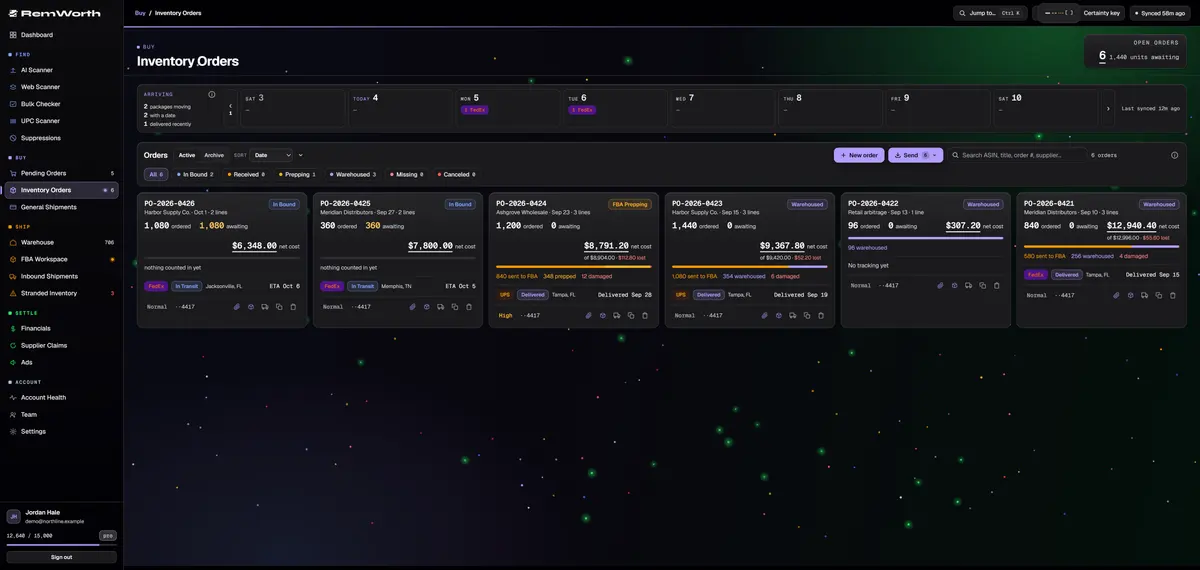
A store run on the order board.
Each store run starts here: the store, the receipt number, the date and the card, then a line per product.
The card shows what the run cost and where every unit went. This one: 96 bought, all 96 on the warehouse shelf.
The clip attaches the receipt as a PDF. The box beside it counts the run in.
Search every order by receipt number, store, ASIN or title.
The bought-before record
Every store buy, still on file the next time you see the product.
The same product turns up again at another store, at another price. Remworth keeps each buy and what it went on to make.
- The store
- the supplier on the order, picked from your list or added on the spot
- Paid with
- the card, saved as a label and last four digits only, and any cashback portal
- The receipt
- attached to the order as a PDF
- Each price
- every purchase keeps its own cost: the same item bought at $4 in March and $6 in June books each sale at the right one
- Search
- every order by order number, store, ASIN or title
- Sold before
- in a scan review, any ASIN you have sold shows past units and profit, a monthly chart and stock on hand
- At your desk
- on Pro, or on Solo with Lens added, Lens shows on amazon.com product pages in Chrome whether you have sold that ASIN before and, if so, the units still on hand and your cost per unit from your own purchase records
- By store
- spend, gross profit and ROI per supplier, with each store's products ranked inside it
- Old sales
- sales with no recorded cost are held out of profit, never booked at $0; type what you paid for a product once and all its uncosted sales are re-costed
Amazon's rules in 2026
What changed for store-bought stock this year.
Three rules from Amazon's own pages that touch store-bought stock. Checked October 2026.
- Amazon barcodes on reseller stock. Amazon ended commingling effective March 31, 2026. For inventory shipped from that date, resellers must use Amazon barcode stickers, even on products that already carry a manufacturer barcode. Brand owners with the Brand Representative role in Brand Registry are the exception, for products that have a manufacturer barcode.
- No more FBA prep or labeling service. Since January 1, 2026, Amazon no longer offers prep and item labeling for FBA shipments in the US. An Amazon staff reply in the Seller Forums says products with missing or defective labels could be untraceable, and that such products aren't eligible for reimbursements.
- Keep the paperwork. Amazon's guide to reselling says that when you resell a product from a retailer you might need additional documents, such as invoices. It also tells resellers to keep records of their transactions, such as purchase orders and invoices.
Remworth helps with the parts that are yours to do: request the FNSKU from a warehouse row, print 2×1-inch FNSKU labels straight from the browser, and keep every buy on file with its store, date, card and receipt. More on labels: FBA box and item labels.
Straight answers
What Remworth doesn't do for retail arbitrage.
- Store Mode isn't an app you install, and it isn't part of Solo. It runs in your phone's browser and comes with Lens: included in Pro, or $49.99 a month on its own or added to a paid Solo plan.
- It sells no lead lists and sends no clearance or deal alerts.
- It doesn't apply for ungating. When Amazon offers an approval path, you get the link; the application is yours.
- On a store buy you log by hand, the cost booked to your sales is the buy cost you type. Remworth doesn't take card cashback off it or add sales tax to it; the card and the cashback portal are recorded by name. Enter the cost you want booked before you receive the order.
- Lens isn't on the Chrome Web Store yet. For now it is installed by hand from Chrome's extensions page.
Next in the workflow
Questions
Retail arbitrage questions
What is retail arbitrage?
Buying products in retail stores at lower prices and reselling them for a profit. That is how Amazon's own guide to reselling defines it. Online arbitrage is the same idea with online stores as the source. Remworth works on both halves: Store Mode, part of Lens, scans the shelf, and the rest of the app takes over after the buy.
Is retail arbitrage legal, and is it allowed on Amazon?
Amazon's own guide to reselling covers retail arbitrage. It says that when you resell a product from a retailer you might need additional documents, such as invoices, and tells resellers to verify that products are authentic before selling them. In US copyright law, section 109 (what the Copyright Office calls the first sale doctrine) lets the owner of a lawfully made copy sell it without the copyright owner's permission. Amazon still decides what your account can list. This is general information, not legal advice.
What is the best app for retail arbitrage?
For the aisle you want a scanner on your phone. Remworth's Store Mode, part of Lens, runs in your phone's browser with nothing to install: scan a barcode and see up to five matching Amazon listings, with profit and ROI at the shelf price and whether your account can sell each one. After the buy, Remworth is the order and receipt, receiving, the warehouse shelf, FBA shipments, and profit checked against Amazon's settlements.
Is there a free retail arbitrage app?
Remworth has no free plan. Its 7-day trial is free, needs a card, and nothing is charged if you cancel before day 8. The trial opens your plan's features except AI scan rows, so the Bulk Checker, receiving, the warehouse, FBA shipping and profit all work in it.
Do retail arbitrage items need Amazon barcode labels in 2026?
Yes. Amazon ended commingling effective March 31, 2026: for inventory shipped from that date, resellers must use Amazon barcode stickers even on products that carry a manufacturer barcode. Amazon also stopped offering prep and item labeling for US FBA shipments on January 1, 2026, so the labels are yours to apply. Remworth requests the FNSKU from a warehouse row and prints 2×1-inch labels from the browser.
How do I check if I can sell a product before I buy it?
Check it on your own seller account. Before a trip, paste up to 500 ASINs into the Bulk Checker: each comes back Ungated, Can apply (with Amazon's approval link) or Restricted, with Amazon's reason. At your desk, Lens checks gating on your connected account as soon as you open an amazon.com product page in Chrome. In the store, Store Mode, part of Lens, checks each match on your account when you scan the barcode.
How do I send retail arbitrage items to Amazon FBA?
Each unit needs its Amazon barcode label; then the units go into boxes on an inbound shipment. In Remworth, counted-in units go into a shipment from the order or from the warehouse, and the FBA Workspace runs Amazon's steps: the plan, packing, placement, carrier, delivery window, box labels and marking it shipped.
What are the best stores for retail arbitrage?
No list fits every seller. Name each store as the supplier when you log a buy, and Remworth shows your spend, gross profit and ROI by store, with that store's products ranked inside it. Your own sales answer the question.
Run your next store haul through it.
Start the 7-day trial, connect your Amazon account, and log your next retail buy: the order, the shelf, the shipment and the profit, in one place.
Solo $199.99/mo · Pro $349.99/mo · 7 days free, card required
On your phone? Start with just your email. The link we email you works once, on any device, within 7 days, and the app opens once you've picked a plan, added your card and connected your Amazon seller account.
Your Amazon password stays with Amazon. How Remworth connects.
Sources
- Amazon: Guide to reselling in Amazon stores (Sep 17, 2025) the definition of retail arbitrage; documents such as invoices may be needed; verify authenticity; keep records of transactions
- News_Amazon: Commingling practices will end effective March 31, 2026 for inventory shipped on or after March 31, 2026, resellers must use Amazon barcode stickers; the Brand Registry exception
- Amazon SP-API changelog: US FBA prep and labeling services to end January 1, 2026 prep and item labeling services for US FBA shipments end January 1, 2026
- Bryce_Amazon, Seller Forums: New FBA Prep Rule (Jan 1, 2026) missing or defective labels could make products untraceable; such products are not eligible for reimbursements
- US Copyright Office: 17 U.S.C. § 109 the owner of a lawfully made copy may sell it without the copyright owner's permission
- US Copyright Office: DMCA Report, executive summary section 109 and the name "first sale doctrine"