Amazon barcode & FBA label requirementsA barcode on every unit.
A label on every box.
Amazon's barcode requirements changed in 2026. For inventory shipped on or after March 31, 2026, resellers must use an Amazon barcode (the FNSKU label) on their products, even ones that already carry a UPC. Remworth gets each FNSKU from Amazon, prints the labels from your browser, then pulls Amazon's own box labels for every box you pack.
- Unit labelsFNSKU barcode, condition and title
- Label stocka thermal roll at your size (2 x 1 in default) or a Letter sheet of 30
- Box labelsAmazon's own, one file for the whole plan
- Box contentsentered, 2D barcode, or manual processing
Amazon barcode requirements, 2026
Resellers label every unit now, and Amazon's labeling service has ended.
An Amazon barcode on every unit. For inventory shipped on or after March 31, 2026, Amazon requires resellers to use Amazon barcode stickers (the FNSKU label) on their products, even when the product already has a manufacturer barcode such as a UPC.
The brand-owner exception. Brand owners with the Brand Representative role in Amazon Brand Registry no longer need Amazon barcode stickers on products that already have a manufacturer barcode. A product with no manufacturer barcode needs an Amazon barcode, whoever sells it.
No labeling service. Starting January 1, 2026, Amazon no longer offers prep and item labeling services for US FBA shipments. That includes inventory sent through Amazon Warehousing and Distribution, Amazon Global Logistics, Amazon SEND and Supply Chain Portal when it goes through FBA.
Missing labels cost you. An Amazon staff reply says products with missing or defective labels could be untraceable, and these products aren't eligible for reimbursement. Amazon flags them as defects, labels them itself, and shows the findings in your Inbound Performance Dashboard.
The checklist
The labels an FBA shipment needs.
The main labels Amazon's pages ask for, where each one goes, and which ones Remworth prints. Amazon's rules come from its own pages, listed at the foot of this page.
| Label | Where it goes | Amazon's rule | Remworth |
|---|---|---|---|
| Amazon barcode (FNSKU label) | every unit | resellers: on every unit shipped on or after March 31, 2026, over the UPC. 1 x 2 to 2 x 3 inches, black on white, non-reflective. | Prints it from your browser, on a thermal roll or a Letter sheet of 30 |
| Box label (Amazon's shipment ID label) | every box, one label per box | Amazon makes a unique label for each box; remove or cover old barcodes on the outside of your shipping boxes | Gets Amazon's labels, every box and every destination in one file |
| 2D box content barcode | every box, when you pick 2D barcodes for box contents | one of Amazon's three ways to tell it what is in each box | Makes it and prints it with Amazon's box labels |
| Pallet labels | each pallet, on freight shipments | four labels for each pallet | Gets Amazon's pallet labels |
| "Sold as set" label | units sold as a set | mark the set as one unit, for example "Sold as set" or "This is a set. Do not separate." | No. You add it. |
| Suffocation warning | poly bags with an opening of 5 inches or more | printed on the bag or attached as a label | No. Use printed bags, or label them. |
| Expiration date | each unit and the outer box of dated products | MM-DD-YYYY or MM-YYYY; 36-point or larger on the outer box | No. Your FNSKU label can show a Best By line; Amazon's date marking is yours. |
Remworth is software, not a prep service. It prints the labels; your team or your prep center puts them on.
From received units to labeled boxes
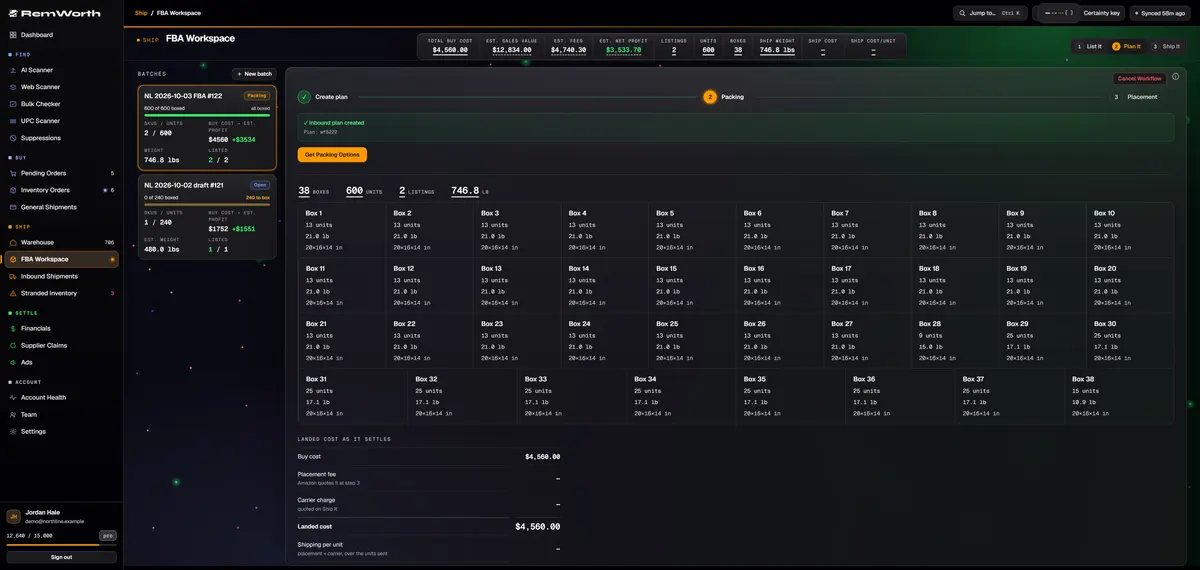
The FBA Workspace, close up.
A batch starts from units you received on your purchase orders, so every unit carries its buy cost. The card shows how many units are boxed.
Create missing listings in bulk, with SKUs from your own pattern. Remworth requests each FNSKU and shows it on the item once Amazon assigns it. Print one product's labels, or the whole batch.
Assign units to boxes and confirm each box's weight and size, with reusable box-size presets. Each box gets its own Amazon label later. Choose how Amazon gets the contents: entered, a 2D barcode, or manual processing.
Create the plan, set the packing, then pick from Amazon's placement options, all from this screen.
Confirm the carrier and delivery window, then print Amazon's box labels for the whole plan in one file, every destination included. On a 2D batch, each box's content barcode prints with them.
What prints, and where
Set your label stock once. Print by product or by batch.
Labels print from your browser. There is no separate label program to install.
- FNSKU labels
- the FNSKU barcode with the FNSKU, condition and title on every label, plus the Best By date when the item has one (you can leave it off when you print one product's labels)
- How many
- one product's labels at the quantity you pick, or every label in the batch at once, with cut lines between products on a roll
- Label stock
- a thermal roll at the size you set, 2 x 1 in by default, or a Letter sheet of 30 where you pick the label to start at. Set it once; every label screen uses it.
- SKUs
- built from your own SKU pattern; stock with an expiration date gets its own SKU for each date
- Ahead of ship day
- request the FNSKU while stock sits in your warehouse, so it can be labeled before the shipment is built
- 2D box content
- a box that could not get its 2D barcode is named on screen, never skipped in silence
- Late changes
- edit box contents after confirmation, within Amazon's limits; the old and new charge show first, with a reminder to reprint the labels
- Backing out
- units pulled back to your warehouse keep their labels and their cost
Amazon's label specs
What an FNSKU label has to look like.
From Amazon's seller guide, help pages and developer docs, checked October 4, 2026. The sources are listed at the foot of this page.
- Label size
- 1 to 2 inches tall and 2 to 3 inches wide
- On the label
- a scannable barcode, the FNSKU, the product title and the condition, in black ink on non-reflective paper with adhesive backing
- Printing
- Amazon's seller guide suggests a laser printer at 300 DPI for best results; Amazon also offers item labels in a thermal format. Amazon's help page says not to use inkjet printers.
- Placement
- a smooth, flat surface, away from corners, edges and curves; cover the original barcode; on the outside of any extra packaging; no damaged or photocopied labels
- Box contents
- three ways: enter the contents, put a 2D barcode on each box, or pay Amazon a fee to enter them during receiving
FNSKU vs SKU vs ASIN vs UPC
Four codes, four different jobs.
As a reseller, the only one you stick on a unit is the FNSKU label, over the UPC.
| Code | What it names | Who sets it | In Remworth |
|---|---|---|---|
| FNSKU | your units of one product in one condition; it is the Amazon barcode on the label, and it starts with an X | Amazon | requested from Amazon, shown on the item, printed on your labels |
| SKU | your offer: your own code for what you sell. An FBA offer and a merchant-fulfilled offer each need their own. | you | built from your own SKU pattern; a dated lot gets its own SKU |
| ASIN | the product in Amazon's catalog. To sell a product already on Amazon, you add your offer to its ASIN. | Amazon's catalog | on every product; the Warehouse finds stock by ASIN or SKU with a standard barcode scanner |
| UPC | the product, from its manufacturer: one kind of manufacturer barcode, like EAN, JAN and ISBN | the manufacturer | the UPC Scanner looks up a supplier list on Amazon by barcode |
Step by step
How to label an FBA shipment in Remworth.
- Set your label stock onceIn Settings, under Labels & printing, pick a thermal roll and your label size, or a Letter sheet of 30. Turn on "Print labels straight to the printer" if you want to skip the preview.
- Get the FNSKUsIn List It, create any missing listings in bulk. Each FNSKU shows on the item when Amazon assigns it.
- Print the unit labelsPrint one product at the quantity you need, or Print All Labels for the batch. The expiration date prints when the product has one; untick it on one product's labels to leave it off.
- Label and box the unitsPut the FNSKU label over the original barcode, as Amazon's guide asks. Assign units to boxes and confirm each box's weight and size.
- Choose the box contents optionEntered contents, a 2D barcode on each box, or Amazon's paid manual processing.
- Plan, then print the box labelsCreate the plan, pick placement, confirm the carrier and delivery window, print the box labels for the whole plan, and mark the shipment shipped.
Straight answers
What it doesn't do.
- Remworth is software, not a prep service. Your team or your prep center puts the labels on the units and the boxes.
- It doesn't print "Sold as set" stickers, suffocation warnings or Amazon's expiration-date marking. Those prep labels are yours.
- It doesn't check Brand Registry. Whether the brand-owner exception covers your products is between you and Amazon.
- It can't pick your printer. The browser prints to the printer it used last; you set the label stock and size once in Settings.
- It isn't a phone scanning app. In the Warehouse, a standard barcode scanner finds your SKU or the ASIN so you can assign it to a bin.
Next in the workflow
Questions
FNSKU barcode and FBA label questions
Do resellers have to use FNSKU labels now?
Yes. For inventory shipped on or after March 31, 2026, Amazon requires resellers to use Amazon barcode stickers (the FNSKU label) even when the product has a manufacturer barcode such as a UPC. The exception is a brand owner with the Brand Representative role in Amazon Brand Registry, for products that already have a manufacturer barcode. Products with no manufacturer barcode need Amazon barcodes for everyone. Remworth requests the FNSKU for each listing and prints the labels.
Can I print FNSKU labels in the free trial?
Yes. Label printing isn't metered. The 7-day trial gives you your plan's full feature set except AI scan rows, and only the AI scanners use those. Connect your Amazon account, and FNSKU labels and Amazon's box labels print in the trial just as they do on a paid plan. A card is required when you pick the plan.
How do I print FNSKU labels on a thermal printer?
Amazon itself offers item labels in a thermal format as well as on sheets. In Remworth, set Labels & printing to a thermal roll and enter your label size (2 x 1 in is the default). Then print from a product, or use Print All Labels for the batch, and the labels open in a print window in your browser. If you print on Letter label sheets, choose the sheet of 30 instead.
What size is an FNSKU label?
Amazon's seller guide says 1 to 2 inches tall and 2 to 3 inches wide. Remworth prints 2 x 1 in by default, has presets for 2¼ x 1¼, 2⅝ x 1 and 3 x 2 in, and also prints a Letter sheet of 30 labels at 2⅝ x 1 in each.
How do I get the FNSKU for my product?
Amazon assigns the FNSKU to your FBA listing. In Remworth you create the listing from a warehouse row or in the FBA Workspace. Remworth requests the FNSKU, keeps checking until Amazon assigns it, then shows it on the item, ready to print.
What are the FBA box label requirements?
Every box gets its own Amazon box label, and each label carries its own package ID, so one label belongs to one box. Remove or cover any old barcodes on the outside of your shipping boxes, as Amazon's seller guide says. For freight, Amazon also issues pallet labels, four for each pallet. Remworth pulls Amazon's box labels for every packed box and every destination in one file.
Do I have to provide box contents? What is a 2D barcode for FBA boxes?
Amazon gives three ways to tell it what is in each box: enter the contents, put a 2D barcode on each box that carries its contents, or pay Amazon a fee to enter them during receiving. Remworth supports all three. On a 2D batch it makes each box's 2D barcode and prints it with Amazon's box labels.
Does Amazon still label my products for me?
No. Amazon stopped offering prep and item labeling for US FBA shipments on January 1, 2026. An Amazon staff reply says units that arrive with missing or defective labels are flagged as defects, labeled by Amazon, and are not eligible for reimbursement. Remworth is software, not a prep service: it prints the labels and runs the shipment, and your team or prep center puts them on.
Label your next shipment from one screen.
Connect your Amazon account, set your label stock once, and print FNSKU and box labels where you plan the shipment.
Solo $199.99/mo · Pro $349.99/mo · 7 days free, card required
On your phone? Start with just your email. The link we email you works once, on any device, within 7 days, and the app opens once you've picked a plan, added your card and connected your Amazon seller account.
Your Amazon password stays with Amazon. How Remworth connects.
Sources
- Amazon (News_Amazon): Commingling practices will end effective March 31, 2026 Amazon barcodes for resellers; the Brand Registry exception
- Amazon staff reply (Jameson_Amazon) on the end of FBA prep and item labeling no prep or item labeling for US FBA shipments from January 1, 2026, including AWD, AGL, Amazon SEND and Supply Chain Portal inventory
- Amazon staff reply (Bryce_Amazon) on unprepped and unlabeled units defects, Amazon labeling, no reimbursement, the Inbound Performance Dashboard
- Sell on Amazon: FBA prep, packaging, and labeling guide unit label size, content, printing and placement; barcodes on shipping boxes
- Seller Central Help: Use Amazon barcodes for FBA label paper and sizes; no inkjet printers; cover every other visible barcode
- Seller Central Help: Product packaging requirements one FNSKU per product and condition; old barcodes on boxes; "Sold as set" labels; suffocation warnings; expiration dates
- Seller Central Help: FBA barcode requirements manufacturer barcodes (UPC, EAN, JAN, ISBN) vs Amazon barcodes, which start with an X
- Seller Central Help: Get started with Fulfillment by Amazon Amazon shipment ID labels; a separate SKU for each fulfillment channel
- Seller Central Help: ASIN creation policy adding an offer to an existing ASIN
- Amazon SP-API docs: Create an inbound shipment the three box-content options; a package ID on each box label
- Amazon SP-API docs: getLabels four pallet labels per pallet
- Amazon SP-API docs: createMarketplaceItemLabels thermal and sheet item-label formats